

If you teach independently online, you already know the real job is never just teaching.
It is teaching, yes. But it is also parent updates, homework creation, grading, quizzes, invoicing, rescheduling, progress tracking, lesson planning, and trying to remember what happened in last Tuesday’s class with that one student who still has two credits left and needs a renewal message.
That is exactly the problem HiClass is trying to solve.
HiClass is an AI-powered tutoring platform built for independent teachers who want to spend less time on admin and more time actually teaching. The big promise behind it is simple: save time, retain students longer, and earn more.
What makes it interesting is that it is not just “AI for teachers” in a vague, buzzwordy way. It is built around the actual workflow independent tutors deal with every day, especially the work that happens before and after class.
Who HiClass is for
HiClass is designed for independent tutors who are juggling a lot at once.
If you have ever felt buried under the non-teaching parts of your business, this is the kind of platform that will make immediate sense. It is especially useful for teachers who:
- write parent reports after lessons
- create personalized homework
- grade student work manually
- build quizzes and review activities
- send invoices and track payments
- manage lesson scheduling and rescheduling
- want stronger parent communication to improve retention
- want to use AI in a practical way, not just as a random add-on
The platform seems especially well suited to tutors working with children and teens, because the parent communication side is such a major focus. That said, many of the features would still be useful for other subjects and age groups too.
The core idea behind HiClass
The platform is built around three goals:
- Retain students longer
- Save admin time
- Help teachers earn more
That is a smart framing, because those three things are deeply connected.
When parents clearly see progress, they are more likely to keep lessons going.
When students get targeted practice between sessions, they improve faster.
When teachers are not drowning in paperwork, they have more energy for better teaching, stronger marketing, and a smoother business overall.
Automatic lesson reports for teachers and parents
One of the standout features in HiClass is its report generation.
After a lesson, the teacher can click one button and generate two different reports:
- a session report for the teacher
- a parent report for the parent
The teacher session report
This report is not just a summary of what happened. It is also a reflection tool.
It includes things like:
- what went well in the lesson
- student performance
- engagement analytics
- participation and talk-time data
- areas needing review
- recommended next steps
- instructional feedback for the teacher
That last one is especially interesting. HiClass is not only tracking student learning. It is also offering feedback on the teacher’s instruction, including what the teacher did well and what could be improved next time.
For independent teachers, that can be incredibly valuable. When you teach alone, you usually do not have anyone observing your classes and giving you meaningful feedback. Having a system that can surface patterns in your teaching is a big deal.
The parent report
The parent report is intentionally shorter and more digestible.
It gives parents a quick but useful picture of:
- what the student learned in the lesson
- what went well
- what needs improvement
- what the teacher will do next
- how the parent can support at home
But the real highlight is this: the report includes short video snippets pulled from the lesson recording.
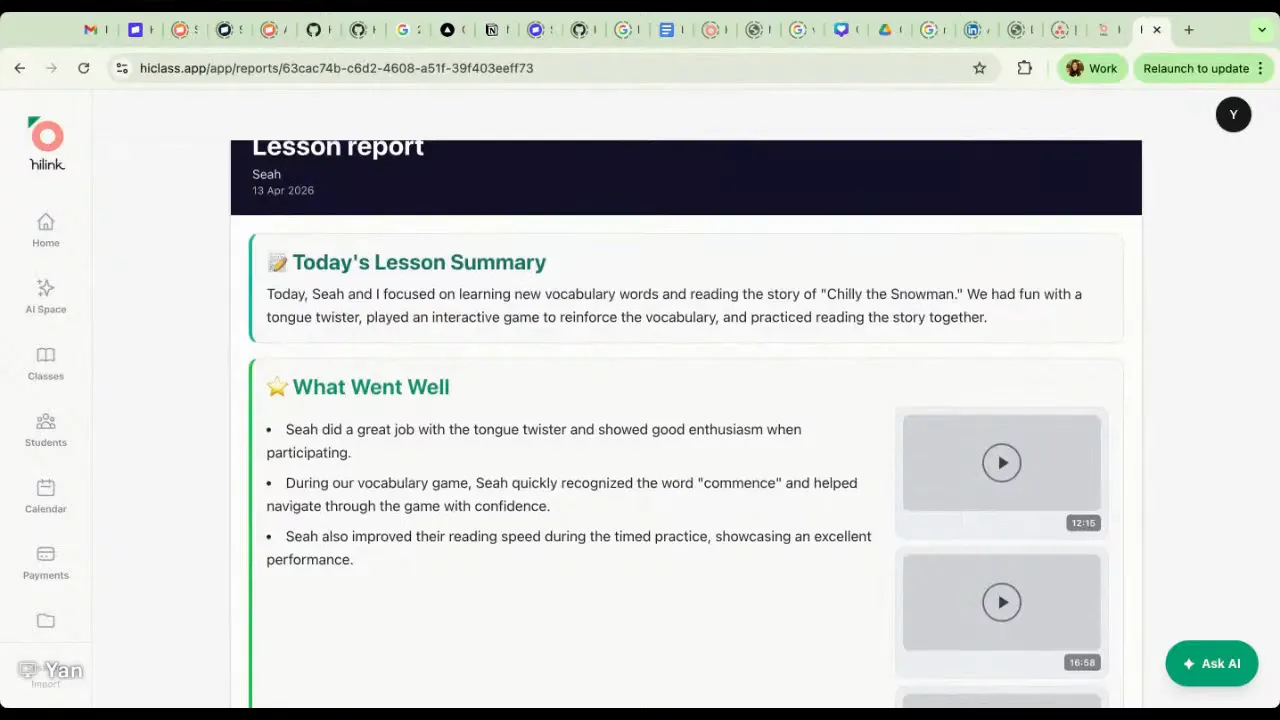
Instead of sending a wall of text that a parent may or may not read, HiClass pairs key points with actual moments from class. So if a student did something especially well, or needs help with a specific area, the parent can see that exact moment without having to sit through a full 60-minute recording.
That is a huge upgrade over the typical parent update.
And yes, the snippets are tied to that student only, which helps avoid privacy issues in group settings.
Why the video snippets matter so much
This is one of those features that sounds nice until you think about how parents actually behave.
Most parents are not going to read a long, detailed report every week. But they absolutely do want to see their child learning.
That visual proof matters.
It helps parents feel connected to the class experience. It makes the tutoring feel more real. And it gives them something memorable they can talk about with their child later.
It also makes online teaching feel more aligned with what parents often get from in-person schools or daycare programs, where photos and snapshots of activities help them feel involved.
If you are a teacher building a premium tutoring business, features like this can strengthen retention in a way plain text updates often cannot.
A built-in student portal and parent portal
HiClass also includes dedicated portals for both students and parents.
What students can do in their portal
Students can:
- join upcoming classes
- schedule or reschedule lessons
- complete homework and quizzes
- review results and feedback
- practice with an AI tutor
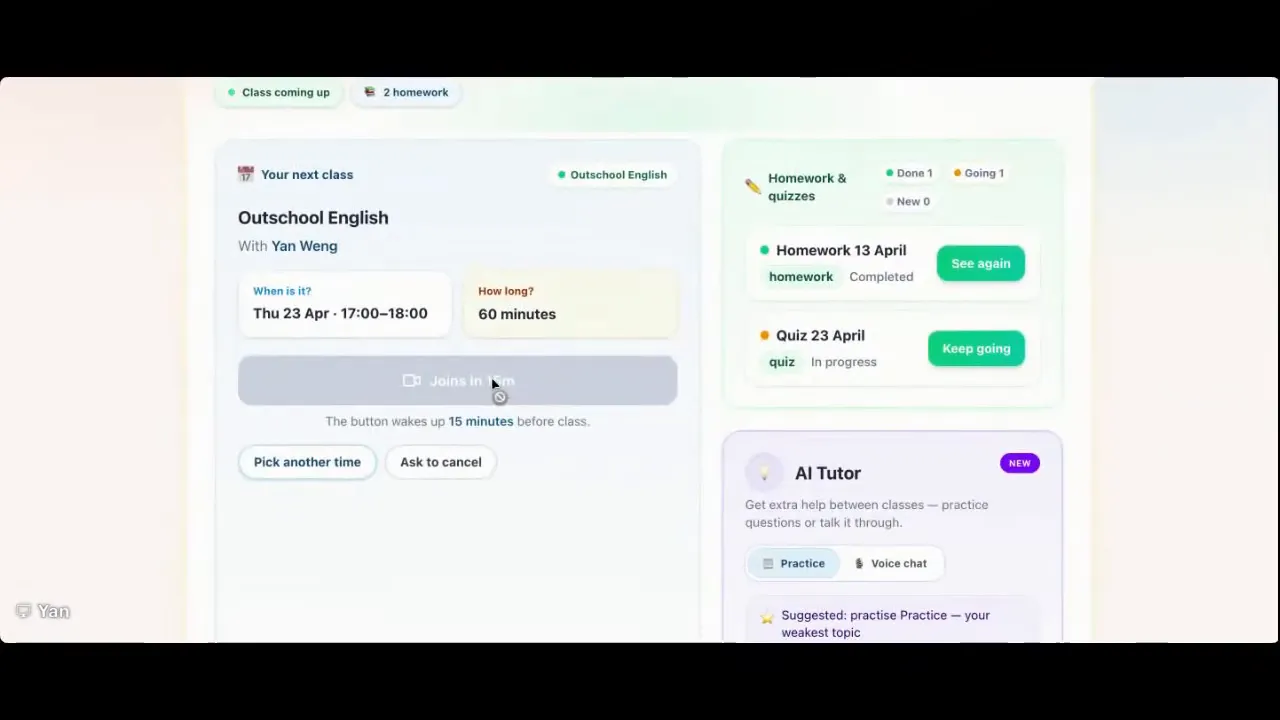
This means the teacher does not need to manually send links for every assignment. Once homework or a quiz is shared, it appears in the student’s portal automatically.
What parents can do in their portal
Parents can log in and see:
- their child’s lesson history
- reports from past lessons
- long-term learning progress
- invoices
This is another retention feature hiding in plain sight. When everything is organized and easy to access, parents feel more confident in the value of the tutoring relationship.
AI-generated homework with automatic grading
Homework creation is another major time saver.
Teachers can generate personalized homework based on:
- the most recent lesson
- a chosen topic
- uploaded materials like lesson slides
- selected difficulty levels
You can create the same homework for everyone or personalize it student by student.
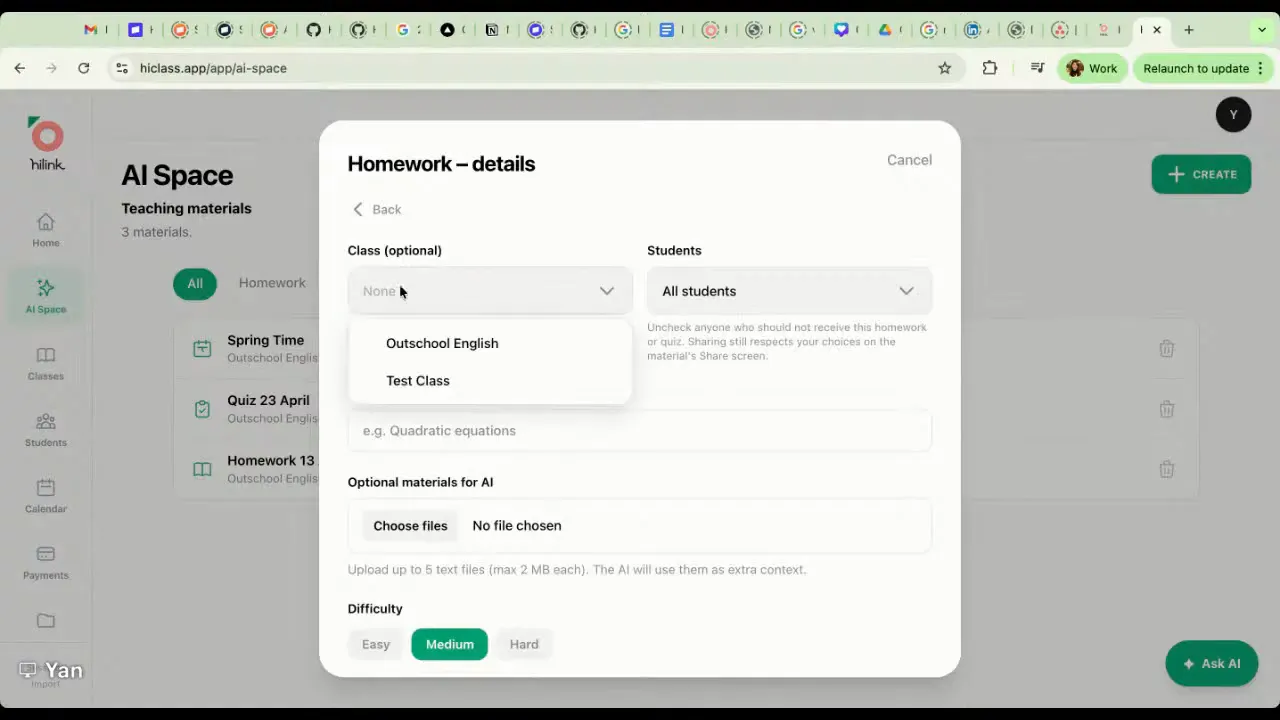
One thing I really liked here is that the homework can be shared as an interactive web activity, not just a PDF. The experience is more playful and gamified, almost like a language-learning app, with immediate feedback built in.
Students can complete the tasks online, and HiClass grades them automatically. The teacher can then review the results and AI analysis instead of manually marking every answer.
That includes open-ended writing tasks too. For writing responses, the AI provides feedback on what was done well, what was missing, and where improvement is needed.
For teachers who assign writing practice, that could be a massive help. You still get insight into student performance, but without spending your evening correcting every sentence one by one.
Quizzes that are fast to build and easy to assign
HiClass can also generate quizzes based on lesson content or uploaded materials.
The format is more traditional than the homework builder, focusing on question types like:
- multiple choice
- fill in the blank
- true or false
- open-ended questions
Teachers can share quizzes as interactive web links or download printable PDFs.
If you use the web version, the results are tracked automatically in the platform, so you can quickly see which students understood the material and which concepts need review.
Lesson plans and slides in one click
If you do not already have a curriculum prepared, HiClass can generate lesson plans and even turn them into slides.
That means you can enter a topic and learning objective, and the AI will produce:
- a lesson structure
- vocabulary targets
- reading passages
- comprehension questions
- presentation slides
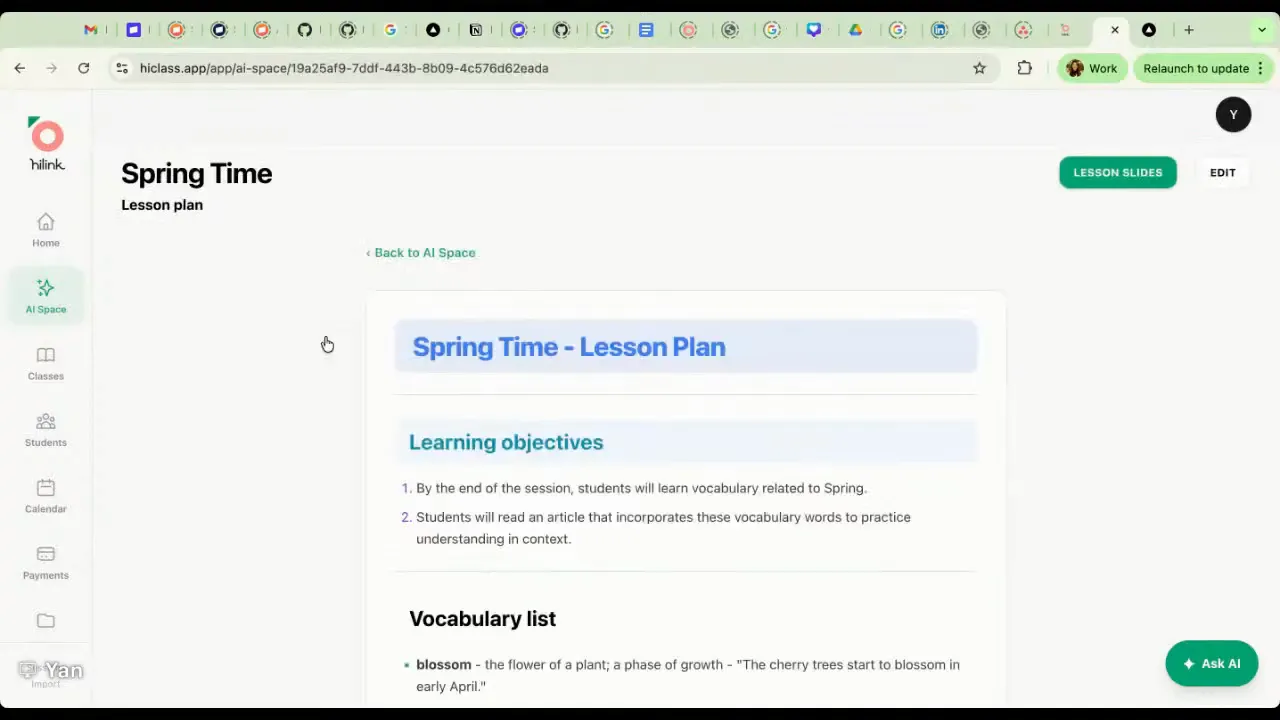
For teachers who need to build classes quickly, this could save a lot of prep time.
It is also flexible. If you already use a curriculum you love, you can keep using it. If you want to mix your own materials with AI support, you can do that too. And if you need something fully generated and customized to a student or topic, the platform can handle that as well.
For younger learners, many teachers will probably still prefer a structured curriculum. But for older students, subject-specific tutoring, or customized lessons, this feature could be especially useful.
The virtual classroom: built in, but optional
HiClass includes its own classroom platform called HiLink.
Teachers are not forced to use it, which is a smart move. If you already teach on Zoom, Google Meet, ClassIn, Koala Go, FunClass, or another platform, you can keep doing that and simply embed your recurring lesson link inside HiClass.
But if you want an all-in-one setup, the built-in classroom is available as part of the subscription.
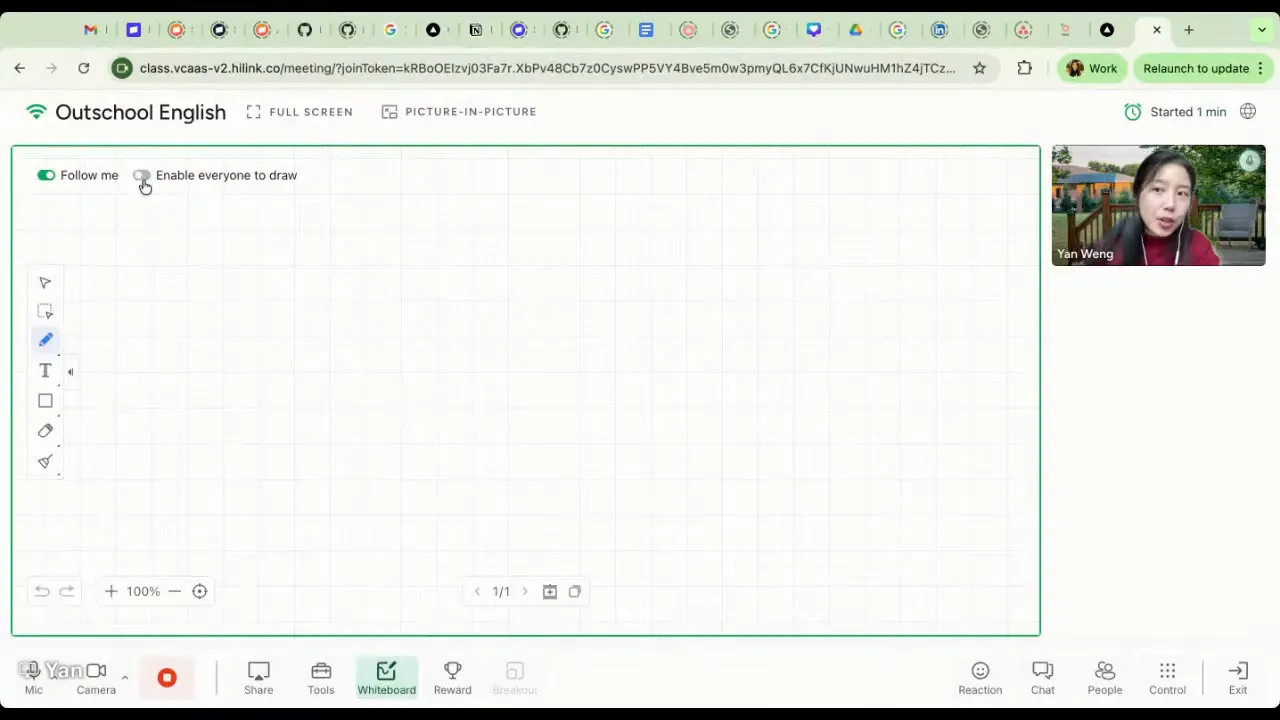
The classroom includes tools like:
- whiteboard functions
- image and PDF upload
- in-class quizzes
- countdown timers
- dice and random name tools
- chat and file sharing
- reward effects for students
- embedded tools such as Nearpod
The lesson recording also starts automatically, which is how HiClass gathers the context it needs for reports, feedback, and AI analysis.
So if you want convenience, the classroom is there. If you want flexibility, that is there too.
The daily dashboard and renewal reminders
The teacher dashboard includes a daily briefing section that highlights the most important things needing attention.
This includes reminders such as:
- which students need to renew
- today’s scheduled lessons
- quick access to class links
- recaps of the last lesson
If you have ever forgotten how many lessons a student had left, or realized too late that a package was about to expire, you know how useful this is.
The platform keeps track of billing packages, subscriptions, and remaining lesson credits so that renewal conversations happen on time instead of after the fact.
Student analytics that go beyond attendance
HiClass does more than list student names and completed lessons. It builds out detailed student profiles over time.
Teachers can see analytics such as:
- attendance
- average talk time
- concept mastery
- practice completion rate
- engagement
- growth and consistency
- drop-off risk
- topic-by-topic progress
- practice accuracy trends
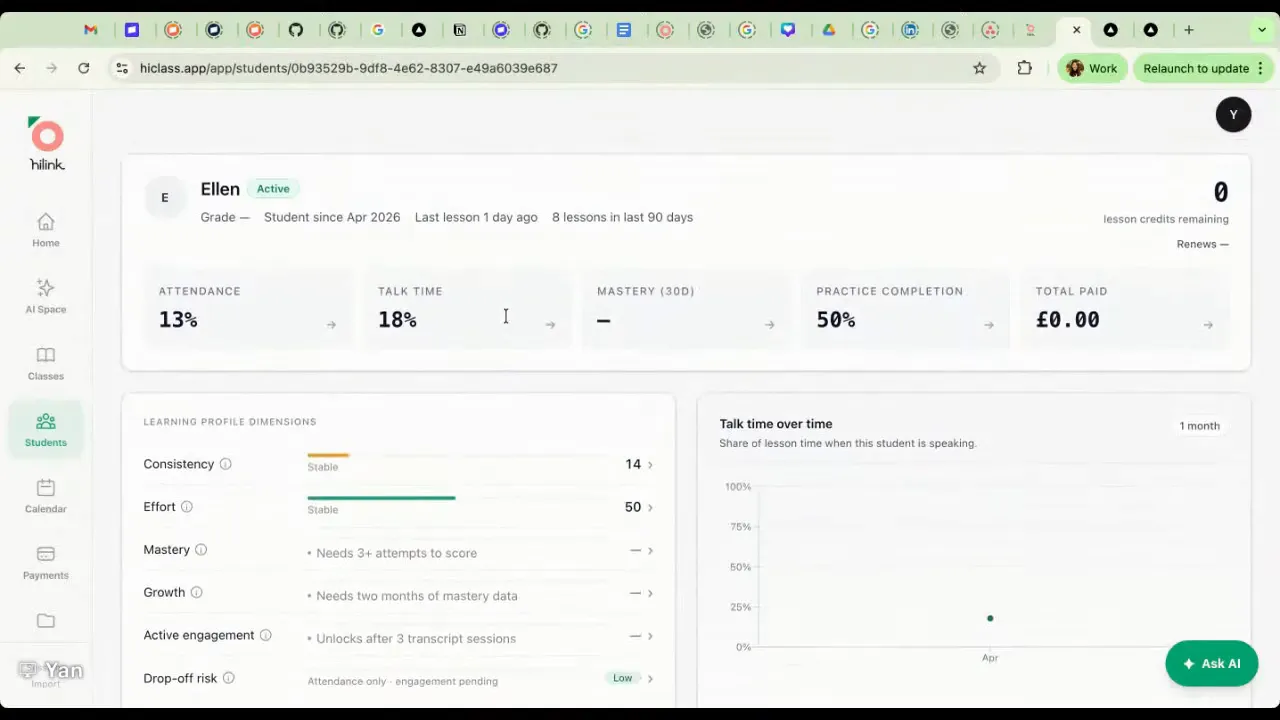
For language teachers in particular, the talk-time data is especially useful. You can see whether a student’s speaking participation is improving over time, along with measures like utterance length and initiation rate.
That kind of information can help you teach more intentionally and also communicate value to parents in a much more specific way.
Long-term progress reports without the manual work
Single lesson reports are helpful, but parents often want a bigger-picture progress update too.
HiClass can generate long-term reports for selected time periods such as one month or three months. These reports summarize:
- how the student has progressed
- strengths
- areas for improvement
- ongoing learning patterns
That saves teachers from digging through old notes and trying to piece together a polished report manually.
An AI assistant that actually knows your students
This is another area where HiClass feels more practical than generic AI tools.
The platform includes an AI assistant teachers can chat with directly. Because it has access to lesson recordings, reports, and student history, it can answer context-based questions such as:
- Who needs extra attention right now?
- Which students are struggling with pronunciation?
- Who has been inactive recently?
- Who is at risk of falling behind?
- Who improved the most this week?
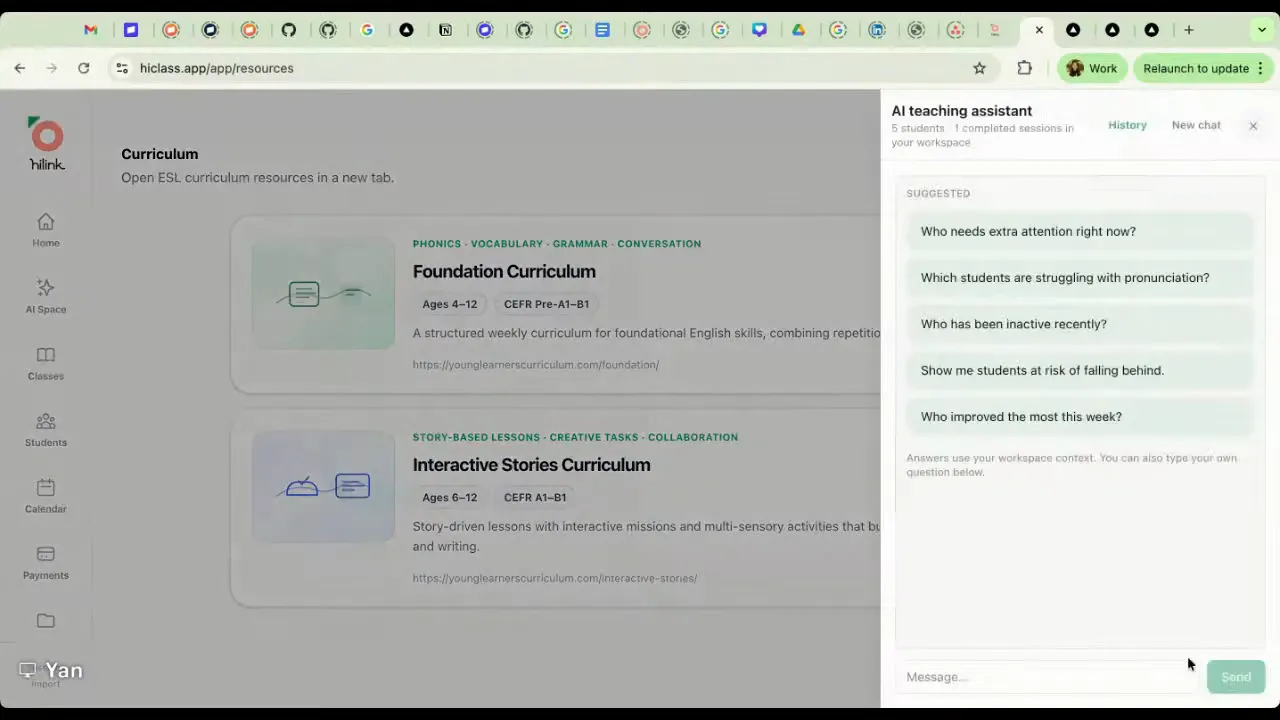
It can also draft messages for parents.
For example, if a student is falling behind or approaching renewal time, you can ask the AI assistant to write a follow-up message based on the student’s actual lesson history. That is much more useful than asking a general-purpose AI tool that has no idea what happened in class.
In other words, it acts a bit like an AI secretary or teaching assistant with memory.
Scheduling, bookings, files, and all the other business pieces
HiClass also includes several practical business tools that help reduce platform-switching.
Scheduling and booking pages
Teachers can set their availability and share a booking link, similar to a Calendly page. Students or parents can then choose from available time slots.
This helps with rescheduling and cuts down on the endless back-and-forth messaging.
File storage
The platform includes a built-in drive for teaching materials, worksheets, and resources. The idea is to keep everything in one place instead of splitting your workflow across multiple apps.
Curriculum integration
HiClass is also interested in embedding high-quality curriculum directly into the platform, which could be useful for teachers who want ready-to-use materials inside the same system they use for teaching and admin.
Payments and invoices
HiClass currently supports payment tracking and automatic invoice generation.
Teachers can record payment information such as:
- the student
- the package type or subscription
- the number of lessons
- the payment method
Once a payment record is entered, the platform generates a professional invoice automatically.
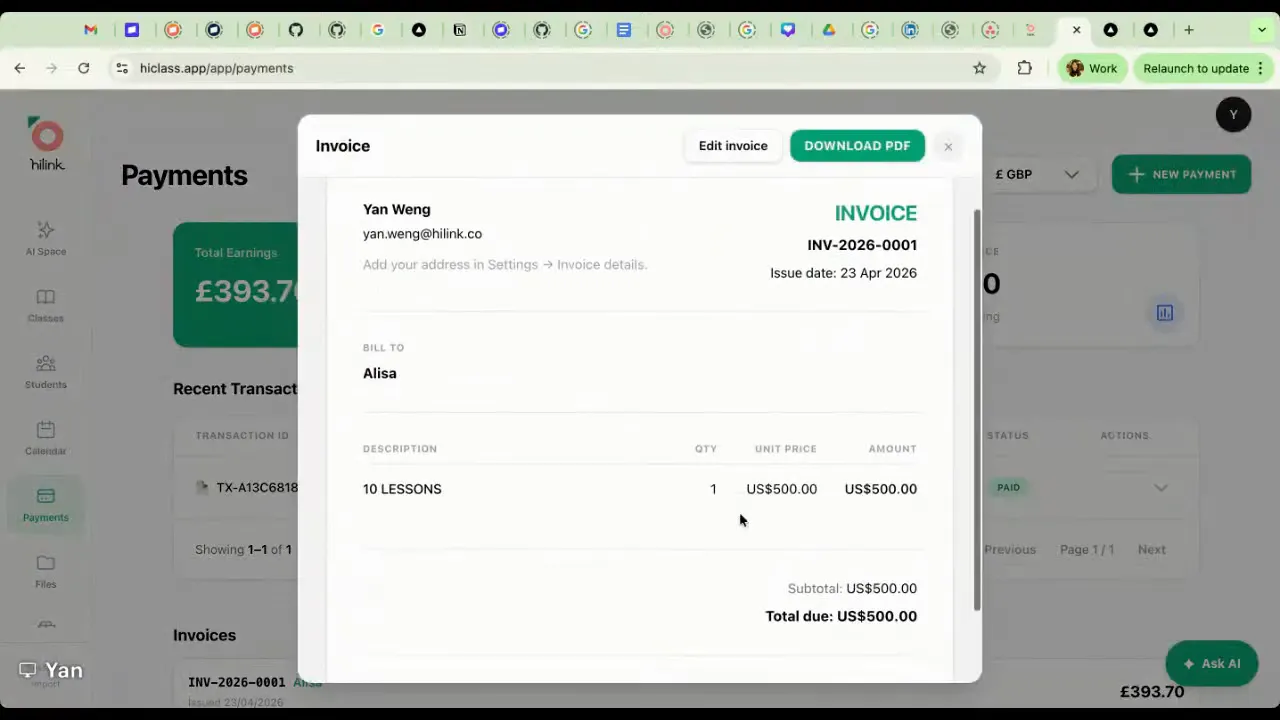
Parents can view invoices in their portal, or teachers can download them as PDFs.
At the time of the demo, direct Stripe integration was not yet active, but it was planned for an upcoming update. So right now the main benefit is tracking and invoicing rather than built-in payment processing.
Can it work for subjects beyond ESL?
Yes.
Even though many of the examples shown were from English lessons, the AI is designed to adjust its analysis based on the subject being taught. So if you are teaching math, science, writing, or another subject, the report focus should adapt accordingly.
That matters because a good AI teaching tool should not force every lesson into an ESL template. It should respond to the actual content and goals of the class.
A practical example for writing teachers
One of the more useful examples shared was how this could work in writing classes.
Say you are teaching a descriptive writing lesson on adjectives. You could use HiClass to generate:
- a quick review quiz after class
- a short writing assignment using three target adjectives
- automatic AI feedback on the student’s writing
- insight into what to review in the next lesson
That is a great example of how AI can support teaching without replacing it. The teacher is still designing the learning experience and setting the goals. The platform just removes a lot of the repetitive admin around it.
A smart marketing angle teachers should not ignore
There is also an overlooked marketing opportunity here.
Because the parent reports include video snippets, families may want to save or share those moments. If your parents tend to post their child’s learning wins on social media, it is worth making sure your slides, classroom materials, or visuals include your tutoring business name or website somewhere appropriate.
That way, if those clips get shared, they can become a natural referral tool too.
It is a simple idea, but a good one.
HiClass pricing
HiClass offers three plan levels.
Free plan
- Up to 3 students
- 10 AI documents
- 3 hours of HiLink classroom use
- 3 GB storage
This is a true test tier. No bank details are required to try it.
Starter plan
- Up to 10 students
- 150 AI documents
- 20 hours of HiLink classroom use
- 20 GB storage
Teachers can also pay as they go for extra AI documents if needed.
Pro plan
- Unlimited students
- 500 AI documents
- Unlimited HiLink classroom usage
- 50 GB storage
Monthly and annual billing options are available, with a bigger discount on annual plans.
There is also a coupon code available: TeacherBoss for 25% off.
You can try HiClass here: https://www.hiclass.app/landing-page
What stands out most about HiClass
There are a lot of AI tools aimed at teachers right now, but many of them solve one tiny piece of the puzzle.
HiClass is trying to solve the whole workflow.
That includes:
- teaching
- lesson delivery
- recording
- reports
- practice
- grading
- parent communication
- renewals
- scheduling
- invoices
The most compelling part, honestly, is not just the automation. It is the retention piece.
Independent teachers do not just need to save time. They need systems that help families stay engaged, understand progress, and feel confident continuing lessons long term. The combination of parent reports, student analytics, homework practice, and lesson snippets is clearly built with that in mind.
If you are looking for a way to use AI in your online teaching business that feels practical instead of gimmicky, HiClass is worth exploring.
And if nothing else, the free plan gives you a low-risk way to test whether it fits your teaching style.
use code TeacherBoss for 25% off
Leave a Reply