
If you have classroom teaching experience, you may already have more of the skills needed to teach online than you realize. Explaining concepts, adapting lessons, and recognizing when a learner needs help all transfer to virtual teaching. What changes is how you deliver those skills through a screen.
Whether you want to apply for an online teaching company or start offering private tutoring, this guide will help you adapt your existing experience, practice your technology, and prepare a short teaching demo.
1. Recognize the Teaching Skills You Already Have
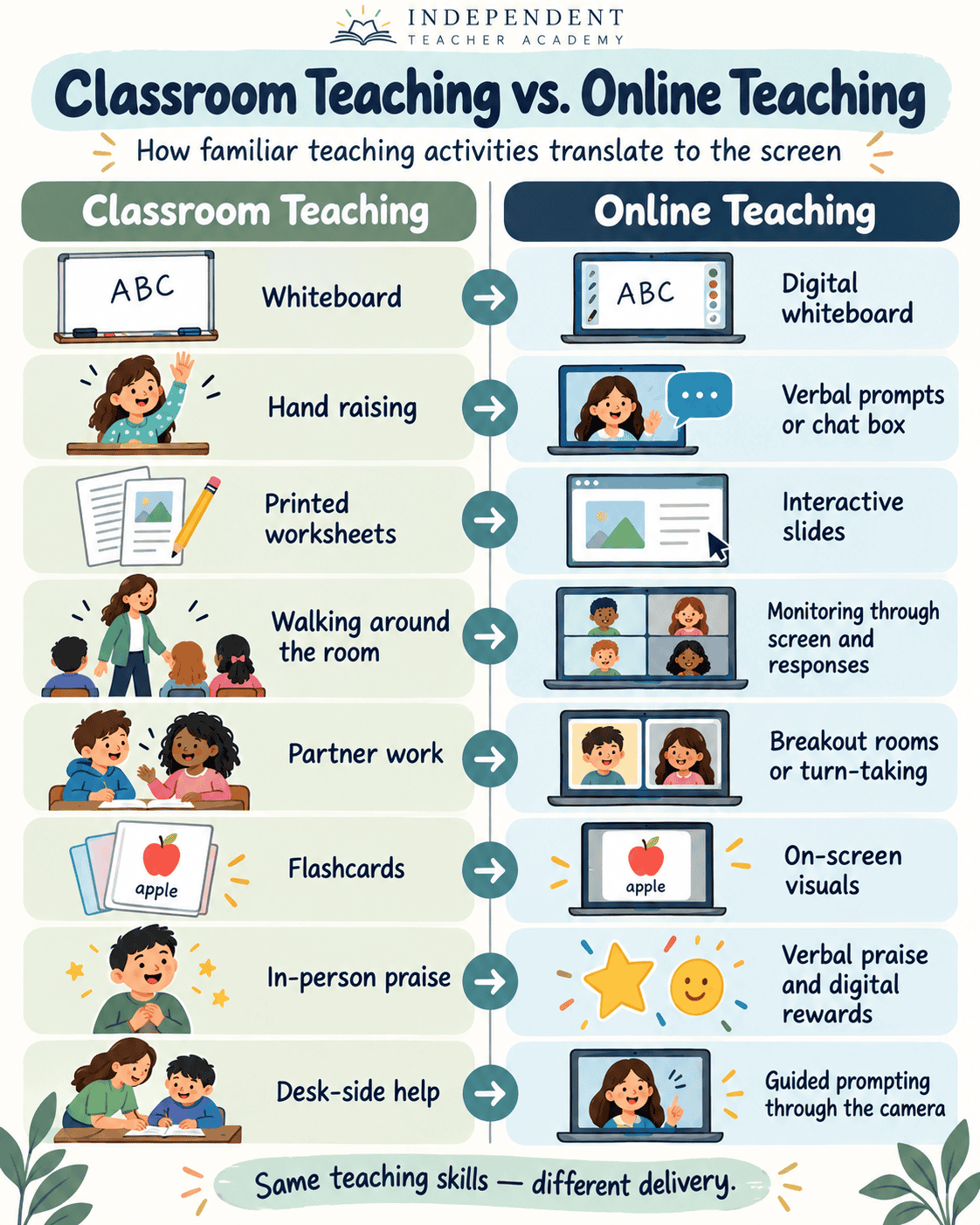
Classroom teachers routinely explain ideas in different ways, spot confusion, adjust the pace of an activity, and help reluctant learners participate. Those same skills matter online.
When you describe your experience to an employer or parent, be specific. “I have classroom experience” says much less than “I taught beginner English learners ages six to nine using pictures and sentence frames to help them answer in complete sentences.”
Try this: Write down three examples of students you have helped, what they were learning, and how you supported them. Use these examples in your teaching profile or application.
2. Get Comfortable With Your Online Teaching Technology
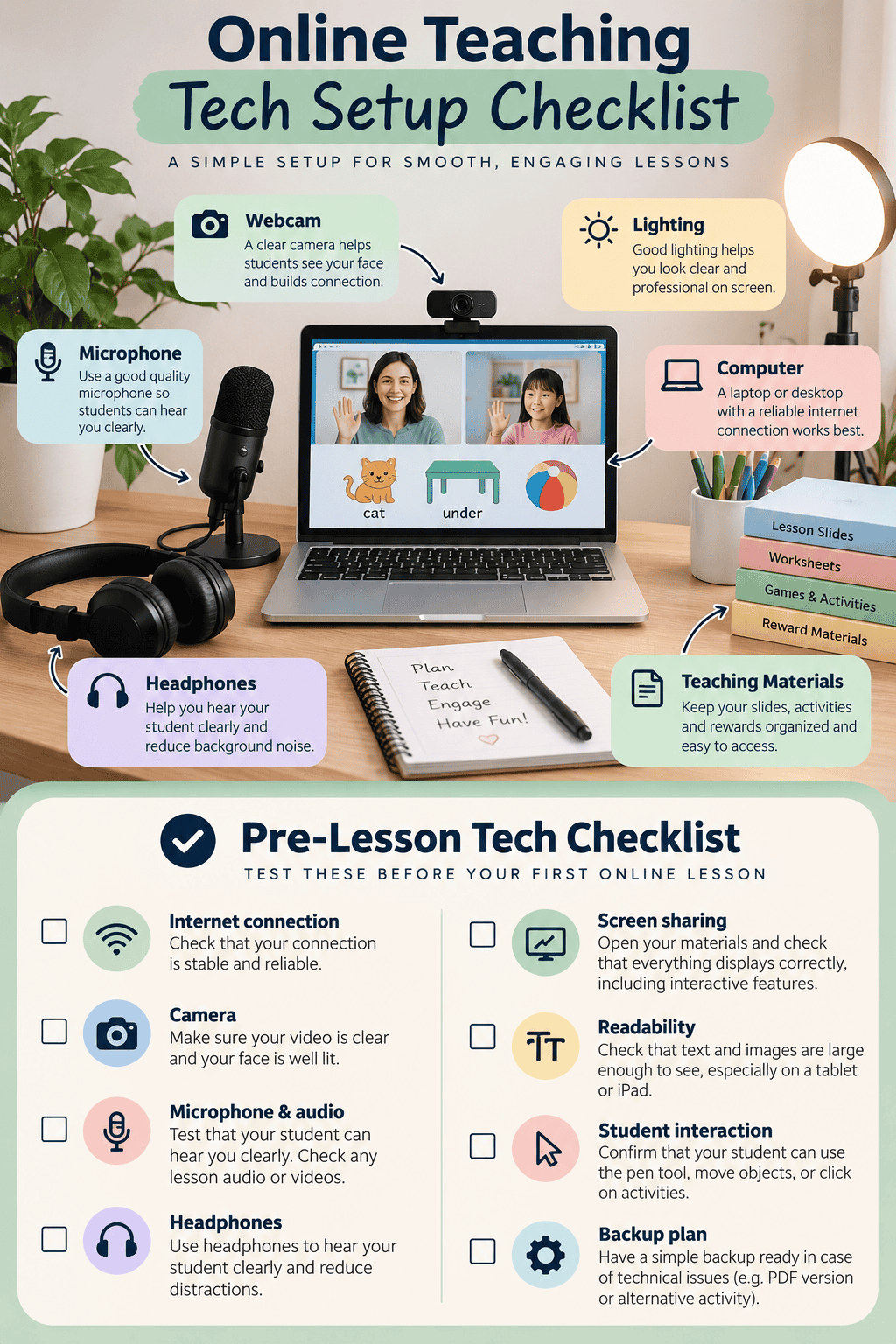
You don’t need to become a technology expert before your first lesson. You do need to know how to open materials, share your screen, play lesson audio, and switch between activities without losing your student.
Test the Student’s View
Ask a friend to join a ten-minute practice call, ideally on a tablet or iPad. Alternatively, join your classroom using a second device. Check whether:
- Text and illustrations are large enough to read.
- The student can hear your voice and any lesson audio.
- Interactive elements actually work for the student.
- Your screen sharing shows the materials you expect.
- Your instructions are clear without pointing at your own monitor.
For example, “Put that over there” may work in a physical classroom, but online you may need to say, “Find the blue pencil. Put it under the table.” Screen sharing can also make a clickable activity appear as a static picture, so always test interactions from the student side.
3. Adapt Familiar Classroom Activities for the Screen
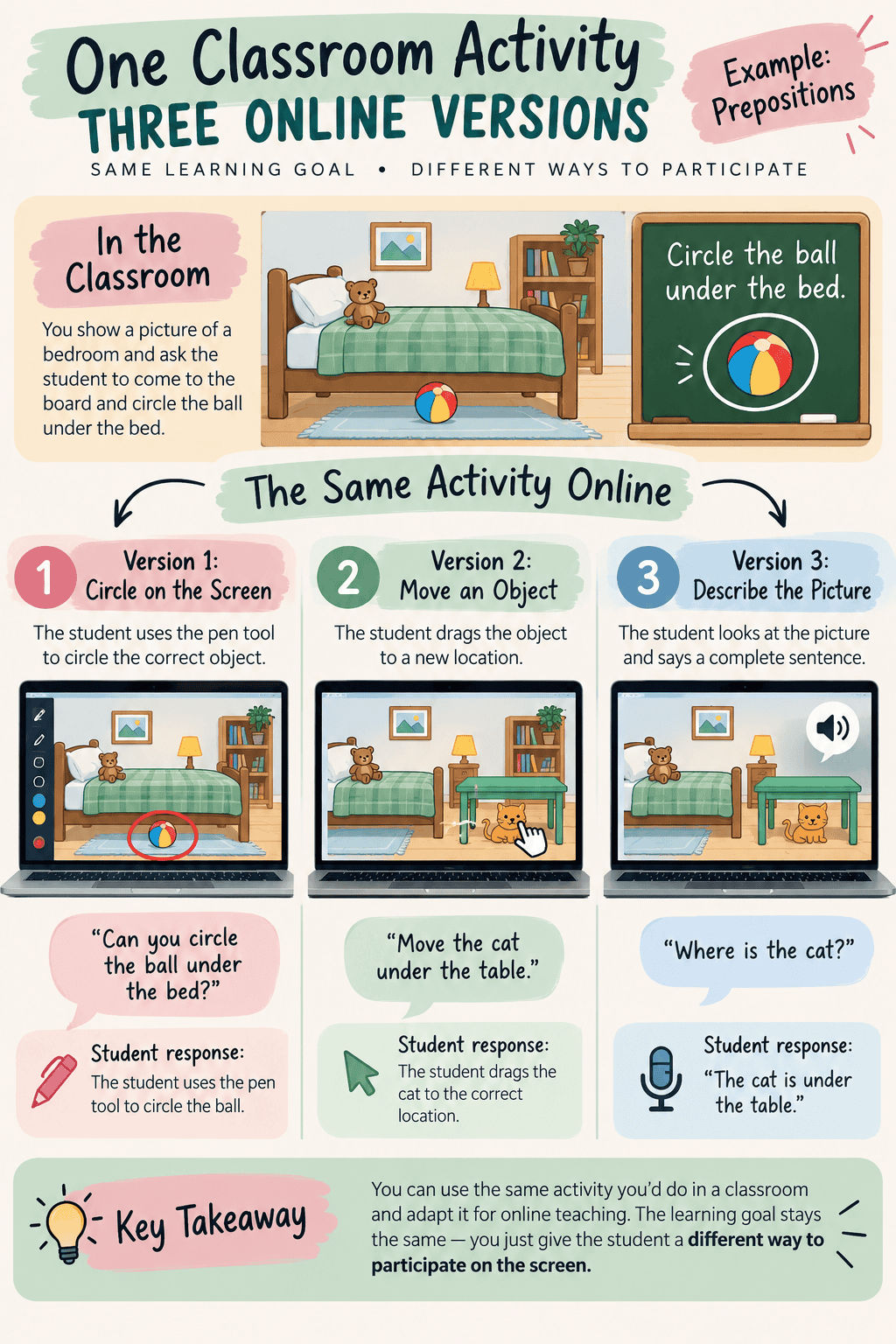
You do not need ten new online games. Start with an activity you already understand and decide how the student will participate virtually.
Example: Teaching Prepositions Online
Imagine teaching the word “under” with a picture of a bedroom. In class, a child might circle the ball under the bed on the board. Online, they could use an annotation pen, tell you where to draw the circle, or say, “The ball is under the bed.”
The objective stays the same; the response method changes. Before each activity, ask: What will my student say or do? This helps prevent a lesson from becoming a slideshow that the learner merely watches.
For ESL lessons in particular, plan frequent opportunities for students to speak. Attractive slides are helpful, but students need to use the language to develop confidence.
4. Record a Short Online Teaching Demo
Many teaching companies require a demonstration lesson. If an employer provides specific instructions, follow those. If you are creating a sample for your own teaching profile, two to three minutes can be enough to show one focused part of a lesson.
A Simple Three-Minute Teaching Demo
- Choose one goal. For example, help a beginner use the preposition “under.”
- Model it. Show a cat under a chair and say, “The cat is under the chair.”
- Prompt the learner. Ask “Where is the cat?” and give them time to respond.
- Change the example. Move the cat under a table and ask for a new sentence.
- Check understanding. Respond to the learner’s use of the target language.
If you are recording without a real student, pause naturally as though the learner is answering, then offer feedback. You do not need to invent an entire conversation.
Review Your Recording
Watch your demo afterward. Could a learner follow your instructions? Were your materials readable? Did you allow enough time to answer? Did you speak too quickly or do too much of the talking? A practice recording gives you something concrete to improve.
5. Choose the Learners and Subjects You Want to Teach
You don’t have to commit to one specialty forever. But a clear starting point helps parents and employers understand who you can support. Perhaps your strength is beginner English for young children, elementary reading, primary math, secondary science, or conversational English for adults.
Compare “I teach online” with “I help elementary students strengthen reading skills through guided practice and phonics activities.” The second statement gives families a much clearer idea of what you offer.
6. Prepare Your Independent Teaching Business
If you teach for a company, it may provide the platform, curriculum, and scheduling. If you are still exploring employers, read our guide to working for Cambly for an example of what to research before applying. Independent teaching gives you more control, but you must establish your own processes. For a broader roadmap, see how to start an online teaching business from scratch.
- Assess the starting point: How will you determine a student’s current level?
- Plan the next steps: How will you choose lessons based on their needs?
- Explain progress: How will you show parents or students what is improving?
- Set policies: Decide on payments, cancellation rules, missed lessons, and rescheduling before your first booking. Our LunaCal scheduling and payment guide explores one tool that can help.
Clear lesson arrangements help avoid misunderstandings and long back-and-forth message threads.

7. A One-Week Checklist for Moving Your Teaching Online
- Choose one learner group you already know well.
- Pick one small learning objective.
- Adapt a familiar activity for online participation.
- Test it with someone on another device.
- Record a short teaching sample.
- Review the recording and improve your pacing and instructions.
- Prepare a clear teaching introduction or profile.
Do You Need Online Teaching Experience to Get Started?
Not necessarily. Requirements vary by teaching company, but classroom experience gives you an important foundation. Instead of only saying “I haven’t taught online yet,” you can explain what you’ve practiced, show a teaching demo, and describe how you’ve adapted your lessons.
Final Thoughts
Transitioning from classroom teaching to online teaching is not about starting over. It is about using your existing teaching skills in a new environment. Begin with one student group, one objective, and one familiar activity. Practice the technology, make a short demo, and refine it.
Interested in finding your own students? Explore the free Start Teaching Independently course mentioned in the video, and check out the related getting-started teaching online video for more guidance. When you’re ready to attract private students, read the seven biggest mistakes online teachers make when trying to get students and our simple weekly marketing routine for online teachers.
What age group or subject would you bring from the classroom into online teaching? Share it in the comments!
Post your Comment About This Product