

Some days, running an online teaching business feels like having five jobs at once. You teach your scheduled classes, prepare lessons, respond to parents, update student records, work on your website, and somehow try to find new students. The work is never completely finished.
And if you are also raising kids, homeschooling, working another job, or building something on the side, a traditional to-do list can become one more thing you feel behind on.
In a recent livestream, I spoke with Kelsey Gascon, a professional trick rider, business owner, homeschooling mom, and homesteader, about the index-card organization system she uses to manage competing responsibilities. It was especially interesting to me because we already know how to turn work into games for our ESL students. Kelsey’s approach applies some of that same thinking to our own productivity.
This article adapts the ideas Kelsey shared for the daily reality of an independent online teacher. The teaching-business examples and sample workflow below are practical adaptations, not a claim that Kelsey follows this exact teacher-specific schedule.
Why Online Teachers Can Be Busy All Day Without Feeling Productive
Picture a normal workday. You open your laptop to plan tomorrow’s classes. A parent messages about rescheduling. You answer the message, notice an unpaid invoice, and open your payment dashboard. Then you remember you wanted to announce a new group class. Before long, the lesson you originally opened your computer to prepare is still unfinished.
The problem isn’t necessarily that you did nothing. You handled real business responsibilities. But because those jobs weren’t on your original list, the day feels like a failure.
Kelsey described another trap: putting an entire project on the to-do list as if it were one task. “Create a course” or “launch a group class” could involve dozens of separate steps. Crossing off a project-sized item is difficult when it was never realistic to complete it in one sitting.
The first change is simple: stop treating projects like individual tasks.
The Index-Card Method: One Card, One Action
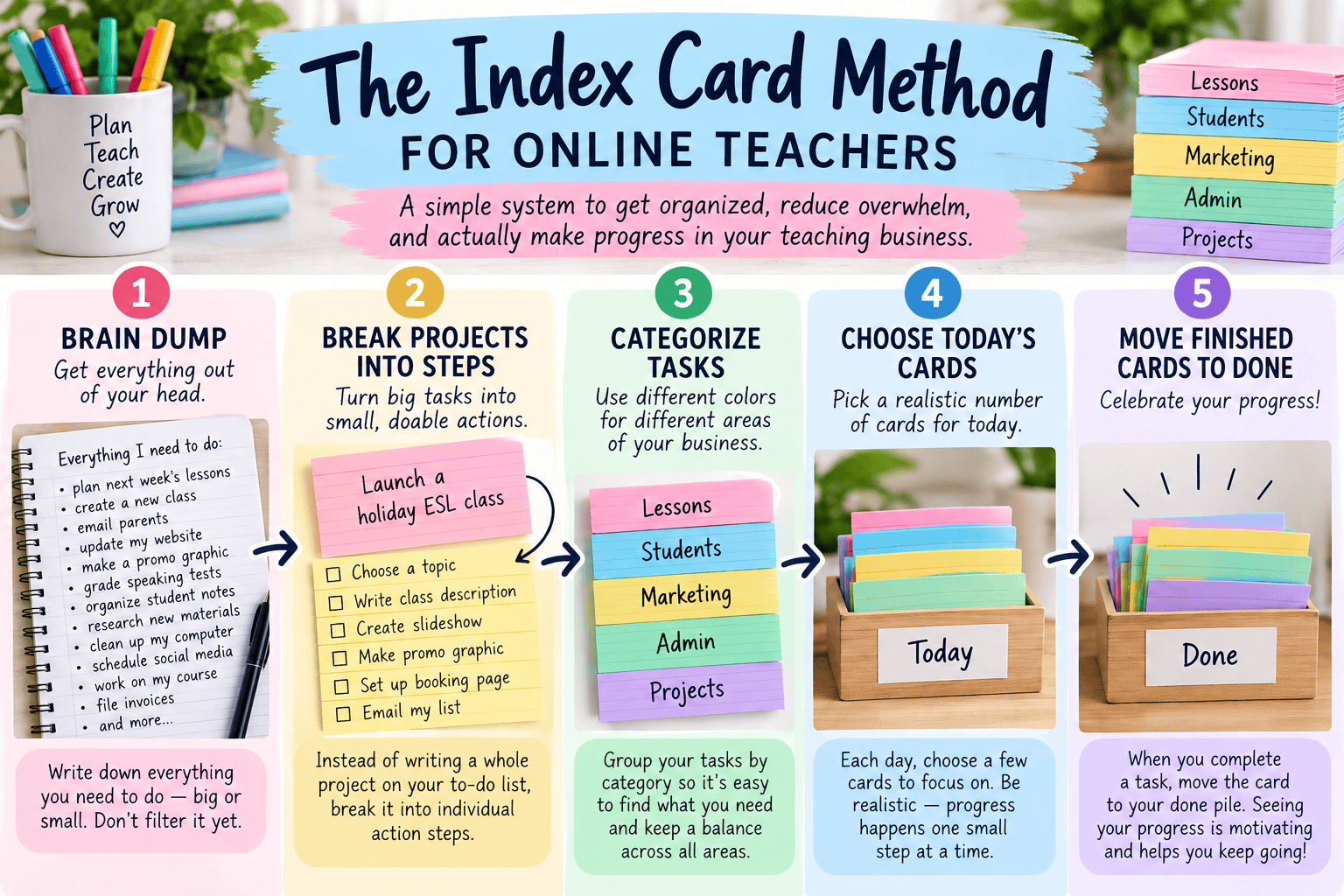
During our interview, Kelsey demonstrated a system built around 3-by-5 index cards. Rather than relying on one enormous list, she writes a specific task on each card, organizes cards by time and category, and moves completed cards into a done section.
Her method is designed to make the next action visible and to help her see what she has actually accomplished. She also distinguishes between one-time tasks and responsibilities that repeat. You don’t need a special app or a perfectly decorated box to try the basic principle. Kelsey shares more about her approach on the Index Card Challenge website.
Start with a quick brain dump
Grab paper and write down everything currently taking up mental space. Don’t edit the list yet. For an online teacher, it might include:
- Prepare lessons for Tuesday’s students
- Reply to a parent about a trial lesson
- Send two invoices
- Update a student’s progress notes
- Create an upcoming holiday class
- Write an email promoting available tutoring slots
- Finish a teaching resource for sale
- Check the booking calendar
The purpose of the brain dump is to get those unfinished commitments out of your head. At this stage, some items will be small tasks while others will still be entire projects. That’s fine.
Break the big items into cards you can actually finish
For example, launch a holiday ESL class is not a one-step task. It could become six cards:
- Choose the class topic and target age group.
- Write the learning objective and short class description.
- Choose the activity or teaching resource.
- Create the booking page.
- Make one promotional graphic.
- Email interested families the booking link.
Each card gives you one concrete action. You can finish one between lessons without needing to complete the entire launch at once. For more on organizing your marketing work, see my simple content plan for online teachers.

Choose Categories That Reflect Your Teaching Business
Kelsey uses different card colors to distinguish areas of her life. You can borrow that idea for your teaching business, even if you only have white cards and colored markers.
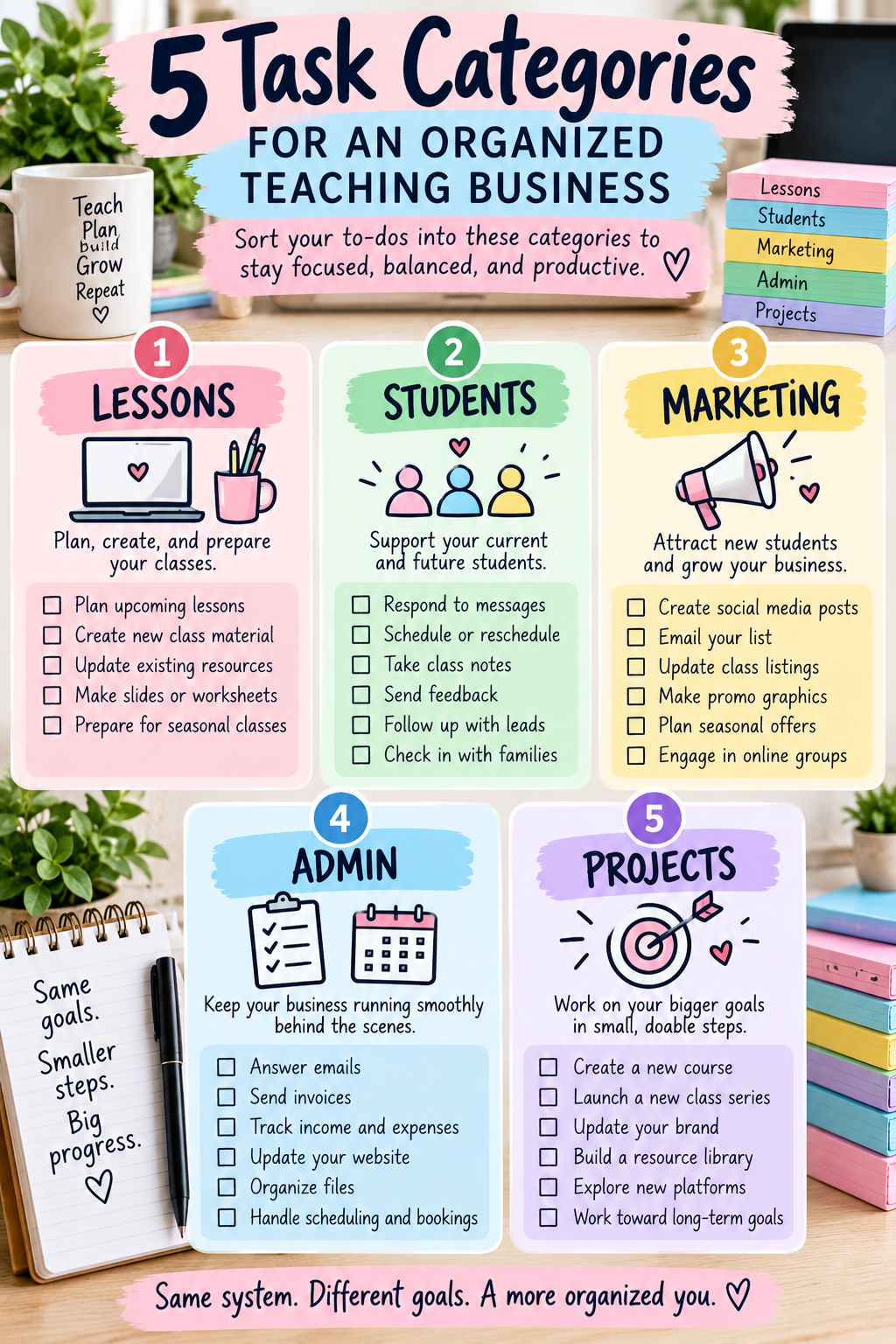
| Category | Example cards |
|---|---|
| Teaching & lessons | Prepare a speaking game; check an assignment; adapt a worksheet |
| Students & parents | Respond to a parent; write progress feedback; confirm a trial |
| Marketing | Draft a social post; send a newsletter; update a class listing |
| Business administration | Send an invoice; reconcile a payment; check upcoming bookings |
| Growth projects | Outline a new course; record a video; revise a website page |
| Personal & family | Handle necessary commitments outside your business |
These are suggested categories, not required rules. Choose a small number that helps you recognize where the work belongs. If a task needs doing once, you might use a white card with a colored stripe. For recurring responsibilities, a reusable colored card could be more useful.
Separate Recurring Work From One-Time Work
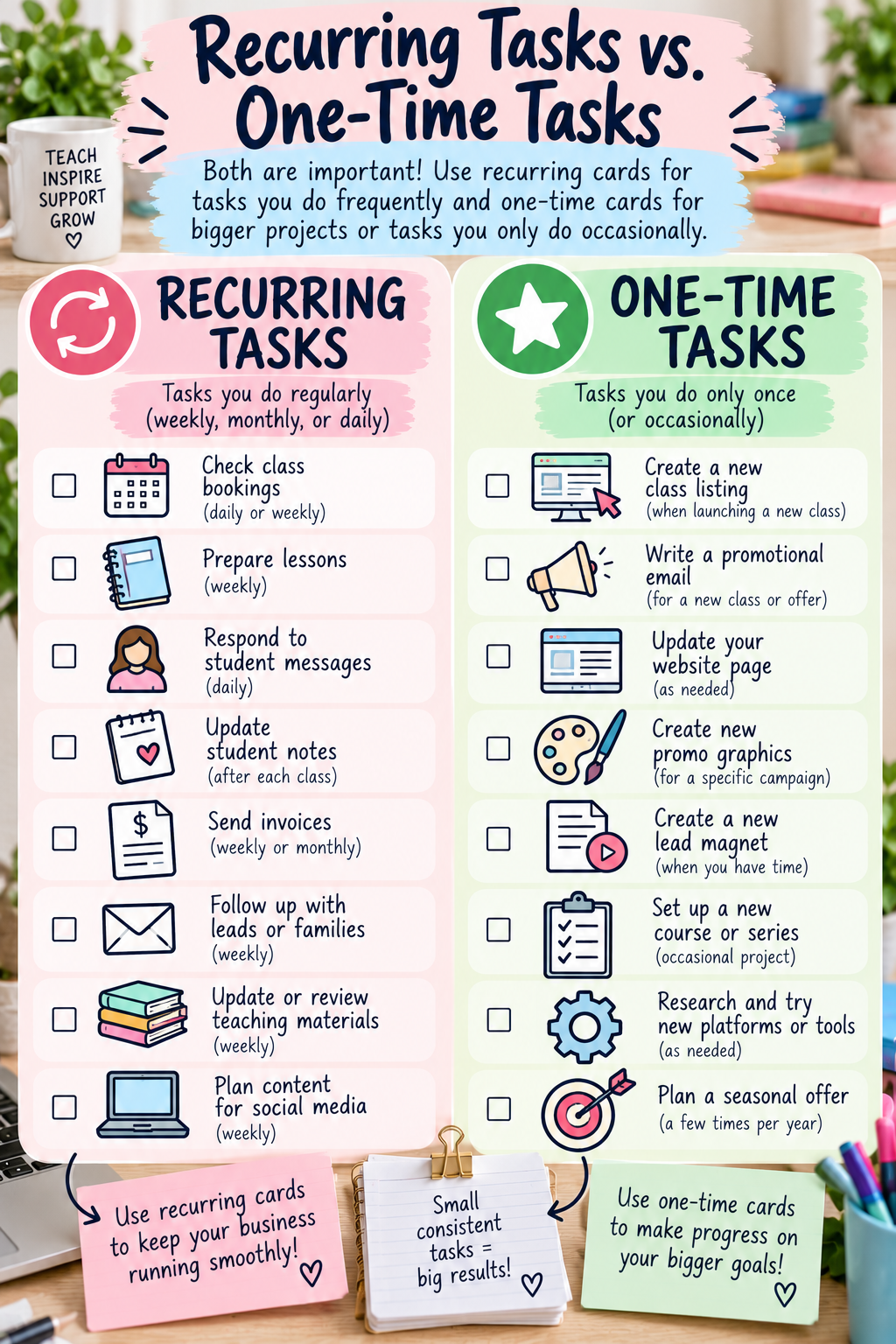
Online teaching has a lot of repetition. Every week you may check your calendar, prepare recurring lessons, send invoices, review student progress, and follow up with families.
Instead of rewriting those responsibilities each week, make reusable cards such as:
- Daily: Check today’s bookings and student messages.
- After each lesson: Record feedback and the next learning target.
- Weekly: Prepare upcoming lesson resources and review trial inquiries.
- Monthly: Review income, expenses, class availability, and marketing results.
Kelsey explained that repeat cards help her avoid carrying every routine detail in her head. The recurring-task idea can work just as well for a tutoring business.
For teachers who prefer a digital version, I have also covered creating a Notion checklist to simplify business tasks. The important part is the action-based structure, not whether you use paper or software.
Organize the Cards by When You Will Use Them
Kelsey’s box includes time-based sections, from today and this week through longer horizons, alongside spaces for things to assign, delegate, and mark done. She also reviews cards that aren’t ready to work on yet so they don’t disappear into a forgotten notebook.
For a simpler teacher-friendly version, start with five dividers:
- Inbox: New tasks and ideas you haven’t sorted.
- This week: Tasks worth addressing soon.
- Today: A manageable selection for your available work time.
- Later: Good ideas and nonurgent projects to revisit at a weekly review.
- Done: Cards you actually completed.
Set a weekly review date. Look through your later cards, move forward the most important ones, and archive or discard one-time cards you have finished. Avoid spending your entire day constructing an elaborate planning system. Kelsey’s advice in the interview was to start doing the work instead of trying to make the box perfect first.
What an Organized Online Teaching Day Could Look Like
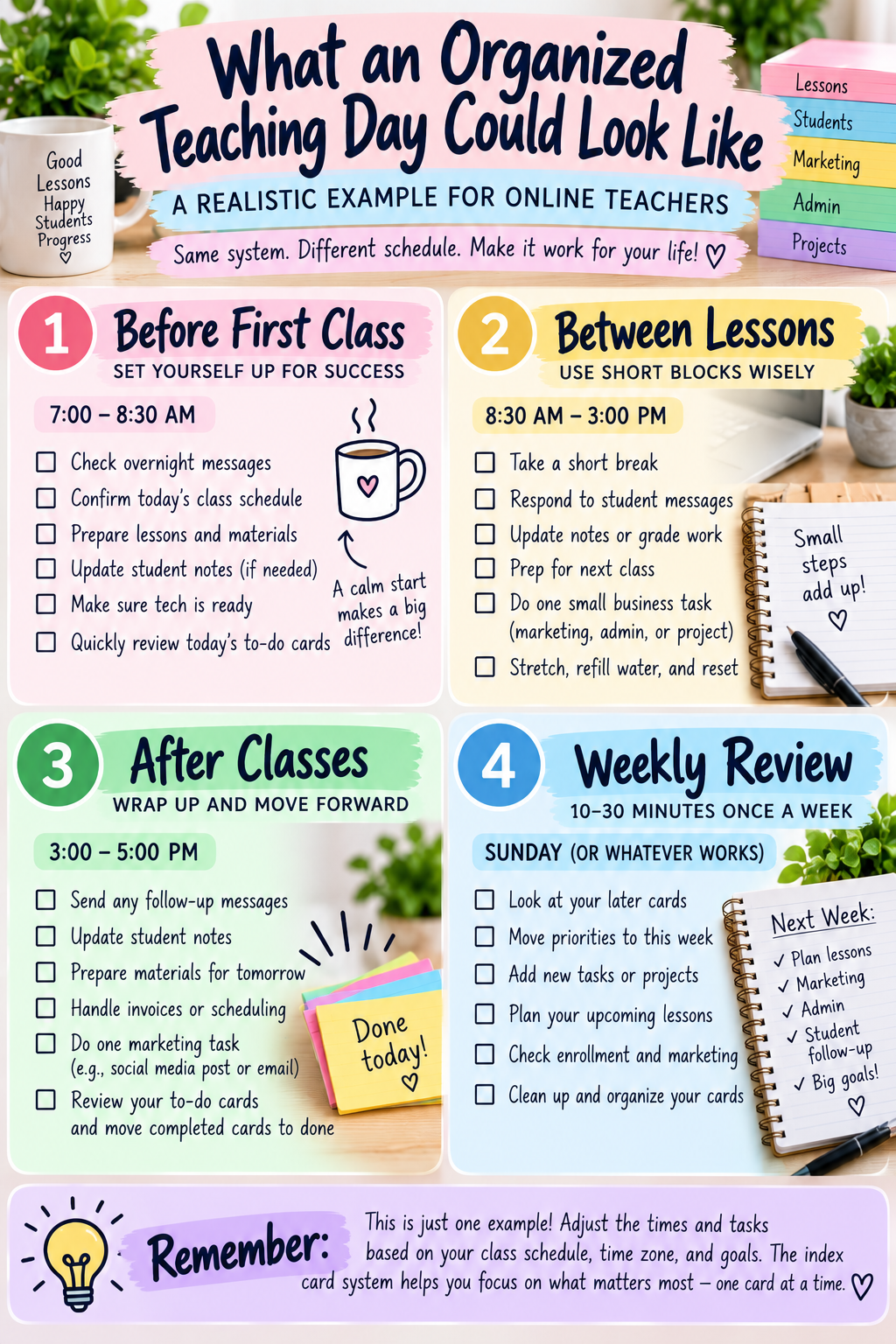
Imagine you have four scheduled lessons, two short gaps, and one hour after your final class. Your cards might look like this:
| When | One specific card |
|---|---|
| Before first class | Open lesson slides and check the student’s previous notes |
| First 15-minute gap | Send one pending parent reply |
| After lesson three | Record the student’s writing target for next time |
| After classes | Draft the email for next week’s open tutoring slots |
| Weekly review | Check whether the holiday class listing is ready |
This isn’t a requirement to schedule every minute. Keep teaching appointments and hard deadlines on your actual calendar. The cards are a flexible way to decide what to work on in the spaces between them.
Don’t Let Marketing Disappear Behind Lesson Preparation

When you’re busy teaching, the activities that bring in future students are easy to postpone. But marketing is part of running a sustainable teaching business.
Instead of a vague card labeled “get more students,” choose actions such as:
- Write one Facebook post about available class times.
- Update the description on one class listing.
- Send an email to families who asked about lessons.
- Turn a recent teaching tip into a short video.
- Review which marketing activity led to actual inquiries.
You can build these into your weekly rotation. My five-day weekly marketing routine for online teachers offers a more detailed way to plan that side of the business.
Seasonal lessons deserve extra attention: a Halloween activity created on October 30 might be useful for current students, but it leaves very little time to advertise a new class. During the livestream we discussed how easily seasonal opportunities slip by. A reminder card several weeks ahead can give you time to design, list, and promote your offer. My guide to the best months for online teachers to get bookings can help you plan those promotions.
Make Progress Visible Without Turning Productivity Into Another Competition
One of the most engaging aspects of Kelsey’s method is its game-like element. She encourages people to notice completed actions, including unexpected work that interrupted the original plan. A necessary parent call or payment issue still took time and effort, even if you hadn’t planned for it.
If you’d like to try the structured version Kelsey discusses, you can join her free 5-day Index Card Challenge and apply the ideas to your own teaching-business tasks. Disclosure: This is a referral link.
You can create a simple personal game:
- Move each completed action card into the done section.
- At the end of the week, review the tasks you completed.
- Notice whether teaching, student support, marketing, and administration received attention.
- Choose one adjustment for the following week.
Kelsey stressed that her challenge is based on individual progress, not comparing one person’s card count with someone else’s. That’s an important distinction: finishing eight tiny tasks isn’t automatically better than completing one complicated and valuable task. Use the cards for clarity and momentum, not a score that makes you feel worse.
What If the Day Completely Falls Apart?
Sometimes a student cancels, a child needs you, a lesson runs late, or a technology issue consumes the time you had reserved for marketing. A flexible system lets you move unfinished cards instead of rewriting an entire plan.
Start by protecting fixed commitments. Then ask which cards are urgent, which can wait, and which can be delegated or simplified. If a big project repeatedly gets pushed back, consider whether the next card is still too large.
The point isn’t to make every day look the same. It’s to have a reliable place to return to after an interruption.
How to Start in 20 Minutes
- Minutes 1–5: Brain dump your teaching, business, and personal tasks onto paper.
- Minutes 6–10: Circle the project-sized items and break one of them into specific actions.
- Minutes 11–15: Write the first few actions on cards and make simple inbox, today, later, and done sections.
- Minutes 16–20: Pick one card you can finish now, and do it.
This is a suggested starter exercise inspired by the discussion, not a prescribed timed routine from Kelsey’s system. You can add reusable cards, colors, and more dividers after you’ve established the habit.
Watch the Full Conversation with Kelsey Gascon
In the full livestream, Kelsey demonstrates her card box and explains how she approaches recurring tasks, categories, planning horizons, and the gamified challenge she created. It is worth watching if you want to see the system rather than only read about it.
More on Getting Organized: Watch This Video
Final Thoughts: Your Business Needs a System You Can Return To
I don’t think online teachers need to squeeze more and more tasks into every available minute. We need a way to see what matters, decide what to do next, and recognize all the behind-the-scenes work that keeps our businesses running.
Start with one card. Make it something you can finish. Then give yourself credit for finishing it—and keep moving.
What is the one teaching-business task you’ve been putting off because it feels too big? Try breaking it into the first three action cards today.
Ready to get organized?
Join the FREE 5-Day Index Card Challenge
Turn your overwhelming to-do list into small, manageable actions. Explore Kelsey Gascon’s index-card system and start making progress on your teaching-business goals.
Free challenge · Hosted by Index Card Challenge · Referral link
Post your Comment About This Product