
10 Ways to Use ChatGPT for Tutors: Practical ESL Workflows and Prompts
The most useful ChatGPT prompts for teachers start with a real teaching problem. A student needs another example. Their writing homework arrives seconds before class. They understand the vocabulary, but they still cannot use it in a complete sentence.
Those are the moments when I find AI genuinely helpful. Not because it decides what I should teach, but because it helps me create the specific support my student needs, often right in the middle of a live lesson.
These are ten ways I actually use ChatGPT in my ESL teaching, with adaptable prompts and the instructional decisions that make the results useful.
Key Takeaways
- Use ChatGPT to extend a structured lesson while keeping instructional decisions with the teacher.
- Include the student’s level, actual difficulties, target language, and task constraints in your prompts.
- Turn writing analysis into targeted teaching, scaffolds, and fresh practice rather than polished rewrites.
- Review AI-generated activities, assessments, and parent feedback before using or sharing them.
Table of Contents
- How I Use AI Without Handing Over the Teaching
- 1. Create an Extra ESL Activity During Class
- 2. Make a Grammar Anchor Chart for a Specific Difficulty
- 3. Turn Your Existing Vocabulary List Into Interactive Review
- 4. Turn Student Mistakes Into Targeted Speaking Practice
- 5. Help Students Give Longer Speaking Answers
- 6. Analyze Student Writing to Find Teaching Priorities
- 7. Turn Writing Feedback Into Scaffolds and New Practice
- 8. Create Personalized ESL Homework From Today’s Lesson
- 9. Review Trial Lessons and Placement Assessments
- 10. Turn Rough Lesson Notes Into Useful Parent Feedback
- The Details That Make ChatGPT Prompts More Useful
- Use AI to Respond to the Student, Not Replace the Plan
How I Use AI Without Handing Over the Teaching
I use AI a lot, both with my own students and when developing Florentis Learning curriculum. It helps me brainstorm, create images, develop activities, work through ideas, and speed up parts of the development process, including coding.
But I do not ask it to produce an entire A2 curriculum and publish whatever comes back. I am still asking the important questions:
- What does this student need to learn?
- Is the language appropriate for their level?
- What have they already learned, and what comes next?
- Does this activity actually accomplish the objective?
- Does it work with a real student?
The curriculum provides the structure. I make the instructional decisions. AI helps me personalize and respond. That distinction runs through every workflow below.
For more lesson-planning ideas, see my Diffit AI curriculum tutorial, HiClass AI overview, and guide to teaching word formation in ESL.
1. Create an Extra ESL Activity During Class
Recently, I was teaching a Florentis Learning Level 4 lesson about going to the doctor. During the lesson, I decided my student needed some additional writing practice.
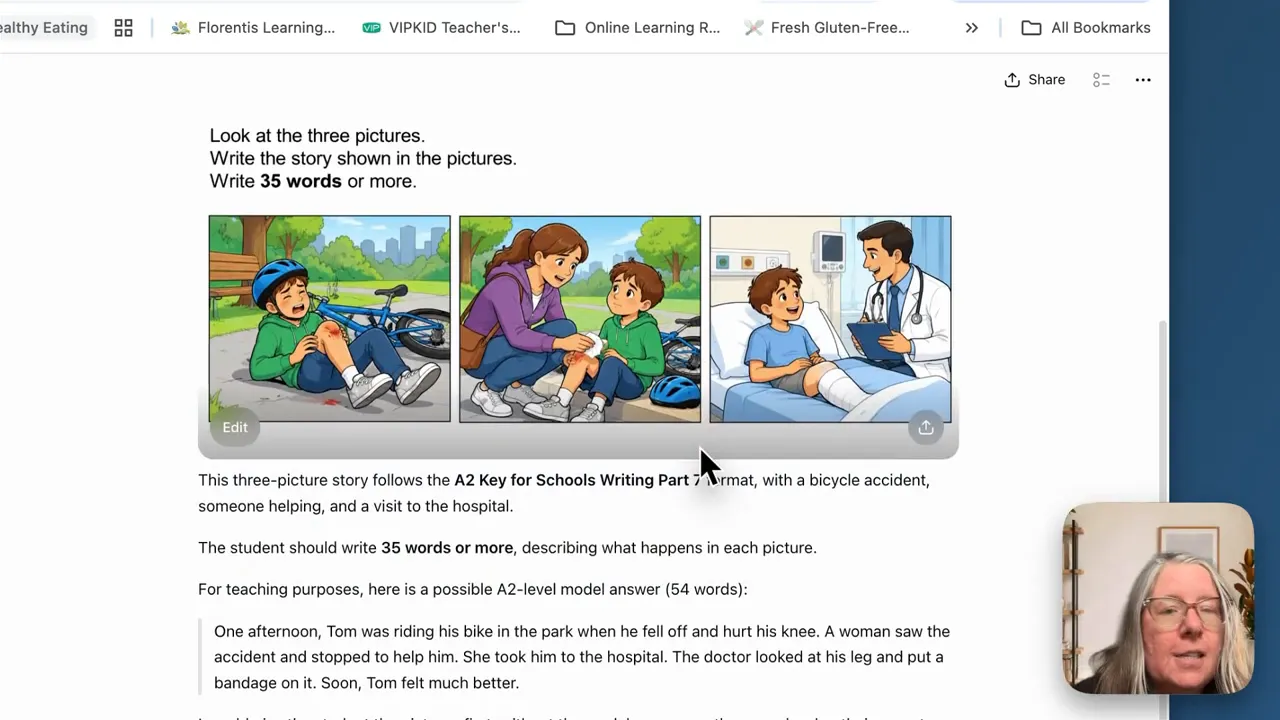
This student was also developing their Cambridge A2 Key skills, so I wanted a task similar to the three-picture story in Writing Part 7. Rather than searching through resources for something that happened to connect with our topic, I gave ChatGPT a model of the task and asked for a new version.
A prompt to adapt
My student is studying visiting the doctor and preparing for A2 Key. Using the attached example as a model, create a new three-picture story-writing task about an accident followed by a hospital visit. Keep the instructions and language suitable for an A2 English learner.
The result was a full-color picture sequence that connected directly to our lesson. We could reinforce the language we had just practiced while also working on an exam skill this particular student needed.
If you need a reference for the task format, Cambridge provides official A2 Key for Schools preparation materials.
The important part is that I already knew the objective, the student’s level, and why I wanted the activity. ChatGPT helped me produce it faster. It did not choose the direction of the lesson.
2. Make a Grammar Anchor Chart for a Specific Difficulty
Sometimes you are explaining a grammar point and realize that your student needs to see it. That might be some versus any, the past simple, comparatives, or another concept that would benefit from a simple visual reference.
I use ChatGPT to create an anchor chart that I can display during an online lesson and share afterward. If you are comparing options for your classroom, I have also explored AI tools for online teachers.
A prompt to adapt
Create an easy-to-scan grammar anchor chart for an A2 English learner comparing some and any. Explain when each is used, include three simple examples for each, and highlight one common mistake. Use student-friendly language suitable for an online lesson.
That gives you a starting point. To make it more useful, add what you know about the student’s actual difficulty.
The student understands that some is common in positive statements, but is confused about choosing some or any in questions. Give that distinction extra attention.
Now you are not simply generating a generic grammar poster. You are asking for a visual explanation of the issue your student is struggling with.
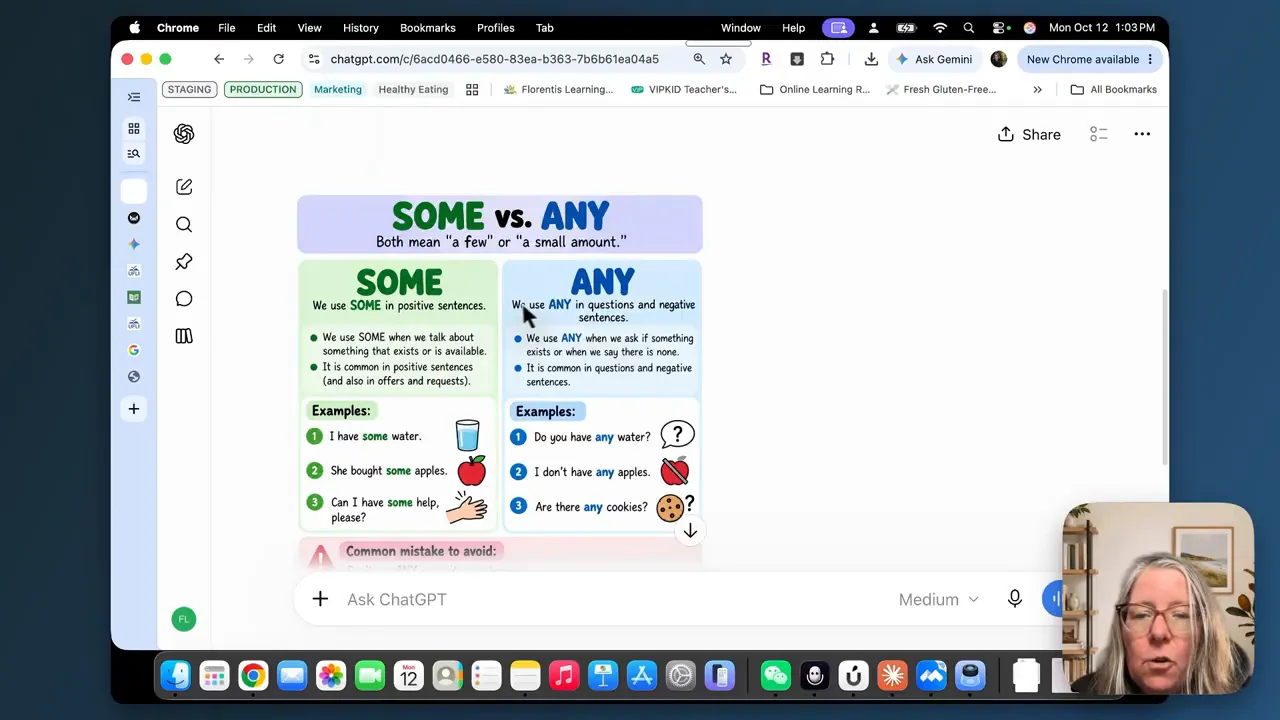
The generated chart gave me rules, examples, and common mistakes to reference. I could download it and put it on screen rather than spending lesson time trying to build a visual from scratch.
3. Turn Your Existing Vocabulary List Into Interactive Review
If I am teaching from a curriculum, I usually do not need ChatGPT to generate ten vocabulary words about going to the doctor. The words are already there.
What I need is a different way to get the student to retrieve and use them. So I give ChatGPT the actual vocabulary from our lesson.
A prompt to adapt
My A2 student has learned these words and phrases: doctor, get well soon, recover, flu, cold, ambulance, hospital, prescription, medicine, and appointment. Design a five-minute verbal review for a one-to-one online lesson. Require the student to recall words, make choices, and use the language, rather than only match words with definitions. Include teacher instructions and spoken prompts.
One useful result was a short “Doctor, Doctor!” vocabulary challenge with several rounds.
- Recall from clues: Describe the person you visit when you are sick, something you arrange before seeing a doctor, or the vehicle that takes injured people to hospital.
- Choose and explain: Give two vocabulary options in a simple situation, then ask the student to explain their choice in a complete sentence.
- Role-play: The teacher becomes the patient, and the student becomes the doctor, asking questions and giving advice.
- Quick assessment: Use a checklist to record which words the student used correctly.
In the example, ChatGPT also produced interactive answer controls. Those can be useful for screen sharing, but I do not automatically display everything. Sometimes an answer is visible elsewhere on the page. Other times, I want the student to practice listening without written support.
This is especially handy when there are five minutes left and I do not want to begin an entirely new activity. I can also add a small reward for correct responses and turn the review into a challenge.
Florentis Learning already has prepared vocabulary-review activities under Class Tools. ChatGPT is useful when I want a slightly different format using the same target language.
4. Turn Student Mistakes Into Targeted Speaking Practice
Your student’s mistakes can give you very useful information about what to teach next.
Suppose you hear sentences such as:
- “Yesterday I go to school.”
- “I see my friend yesterday.”
- “We play basketball after school,” while describing yesterday.
I can recognize the past-tense issue. Rather than only correcting each sentence, I can ask ChatGPT to help me turn that pattern into a short practice activity.
A prompt to adapt
Here are sentences my A2 student produced when describing yesterday: [insert examples]. Identify the shared language difficulty and create a short teacher-led oral activity to practice it. Let the student attempt the language before revealing corrections. Do not begin by providing all the corrected sentences.
In this example, ChatGPT identified the need to practice both irregular forms, such as went and saw, and regular forms, such as played.
It suggested a sequence that included:
- Helping the student notice the difference between a present and past form.
- Using a cue such as “Tell me about school yesterday.”
- Providing a hint only when needed.
- Changing a sentence’s time reference from every day to yesterday.
- Checking whether the student could produce the form independently.
The first activity is not always the one I want. That is fine. I can continue with a simple request for more oral-practice ideas.
Follow-up suggestions included a detective game about a secret event, a past-tense version of two truths and a lie, continuing a story, sequencing events, a verb-recall challenge, spotting differences between sentences, and interviewing the teacher about yesterday.
Some of those suit younger learners. Others, such as two truths and a lie, may work better with older students. I still choose the activity, but AI gives me options I might not have thought of immediately.
5. Help Students Give Longer Speaking Answers
A student who answers a speaking question with two words does not necessarily need a completely new speaking lesson.
If I ask where they would rather go on vacation and get “the beach,” they may simply need a structure for extending their answer.
A prompt to adapt
My A2 student usually answers speaking questions with only one or two words. Create five suitable speaking questions and a reusable frame that helps them give a complete answer, add a reason with because, and include one extra detail. Provide scaffolding, not complete model responses they can copy.
That final instruction matters. Otherwise, ChatGPT is quite happy to provide polished answers for everything. I do not want AI doing the student’s thinking. I want it helping me create support that allows the student to do more thinking.
The reusable structure is simple:
- Answer: Begin with a phrase such as “I prefer…,” “I usually…,” or “My favorite…”
- Reason: Explain the answer using “because…”
- Detail: Add another relevant piece of information.
I also asked for a game version. ChatGPT suggested “Beat the One-Word Monster,” with three available points per question: one for a complete answer, one for a reason using because, and one for an extra detail. The student needed twelve points to defeat the monster.
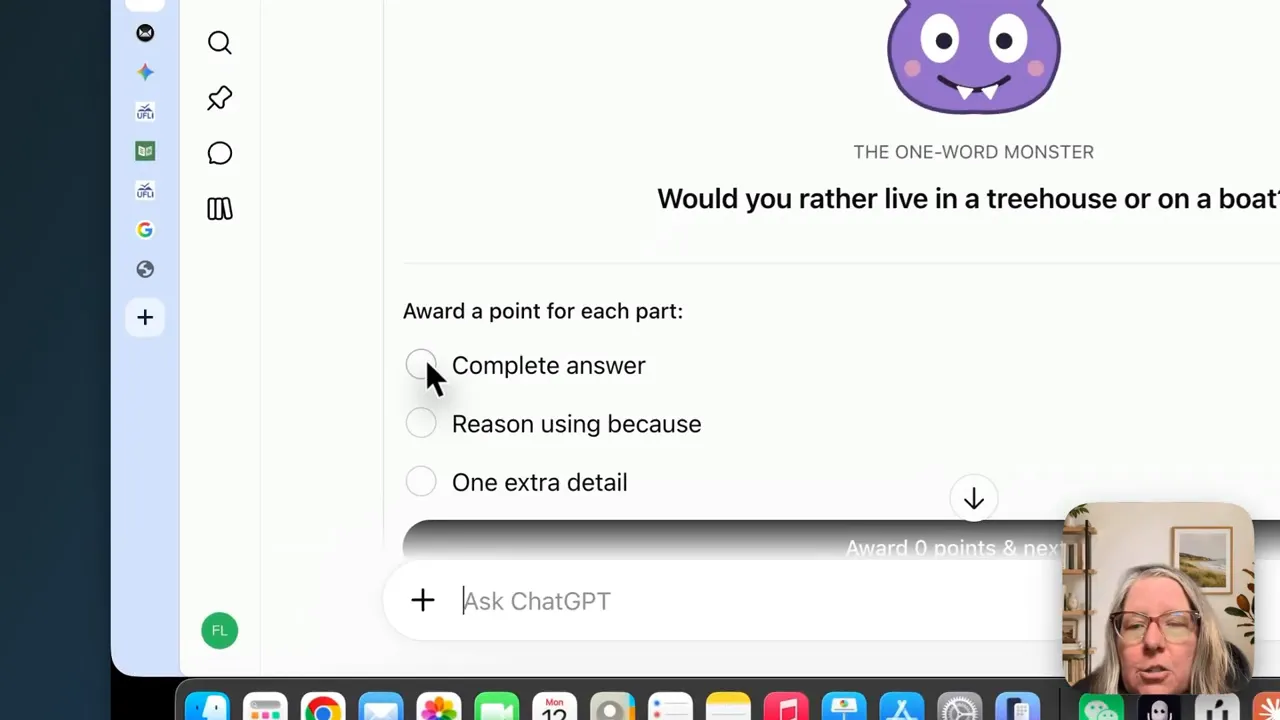
The generated version included a monster graphic, a points system, and eight questions. It was a little bit fun, age-appropriate, and something I could see a younger student enjoying. The game still served the original objective: extending an answer.
6. Analyze Student Writing to Find Teaching Priorities
This is one of my biggest uses of AI. When a student sends writing homework, I can upload a photo or screenshot to ChatGPT and ask for an initial analysis. It is particularly useful when the work arrives just before class starts.
I use this with IELTS students by specifying which writing task they completed and asking for analysis against the relevant criteria, along with an estimated band. The same approach can support A2 Key, B1 Preliminary, B2 First, or regular ESL writing.
A prompt to adapt
This writing is from a student preparing for B1 Preliminary. Review it against the expectations for that level. Identify strengths, recurring errors or weaknesses, and the two or three most important areas for teaching next. Do not rewrite the full response.
What I want is not a perfect replacement for the student’s work. I want a clearer answer to: What should we work on?
For B1 Preliminary, the analysis organized the feedback under content, communicative achievement, organization, and language. It also offered estimated scores, strengths, priority corrections, follow-up activities, and a student checklist.
In the example, the recurring weaknesses included:
- Inconsistent control of the past tense.
- Unclear references and connections between events.
- Problems with word order, articles, and clause construction.
Those observations matched difficulties I had already noticed. At the same time, the student was attempting longer constructions, which was a positive development worth recognizing.
I always review the original writing and the analysis myself. An AI-generated score is an estimate, not an official exam result. If I disagree with the assessment, I do not use it. Cambridge’s official B1 Preliminary preparation resources provide a useful reference point for the exam’s expectations.
I sometimes record scores in my Teacher Hub notes to help track progress over time. During the lesson, I can also ask ChatGPT to select three sentences that illustrate a priority issue, then open the student’s actual work and edit those sentences together on screen.
7. Turn Writing Feedback Into Scaffolds and New Practice
The writing workflow becomes much more useful when it does not stop at identifying mistakes.
Once we know the priority issue, I continue the same conversation with ChatGPT.
A prompt to adapt
Using the weaknesses you identified, create a simple writing scaffold that helps this student improve. Include planning support, sentence starters, or a template where appropriate, but leave the ideas and final response for the student to produce.
The support depends on the student. An IELTS learner might need a paragraph structure. Another learner might need help connecting ideas. An A2 Key student might need a framework for sequencing story events.
In the story-writing example, ChatGPT produced planning forms, linking words, and a checklist. I could copy those into a worksheet and use them for homework.
Then I can ask for another task:
Create a fresh writing task at the same level that practices the same skill in a different topic or situation. Format it as a downloadable PDF activity for the student.
That creates a complete teaching cycle:
- The student produces their own writing.
- I review the feedback.
- We work on the highest-priority needs.
- The student receives an appropriate scaffold.
- They apply the skill in a new task.
This is very different from asking AI to correct the homework and returning a polished version. The goal is new learning, not simply a cleaner piece of writing.
Keeping the student’s actual writing also matters. A portfolio in a tool such as Book Creator can preserve their work and make their development visible, rather than replacing their voice with an AI rewrite.
8. Create Personalized ESL Homework From Today’s Lesson
I do not always want every student completing exactly the same homework. I want the practice to respond to what happened in their lesson.
A brief lesson summary can give ChatGPT enough information to produce something much more targeted than a generic worksheet.
A prompt to adapt
My A2 student studied visiting the doctor today. We practiced vocabulary for symptoms and giving advice with should. They recalled the vocabulary well but struggled to produce complete sentences with should. Create ten minutes of homework that reviews the vocabulary while focusing mainly on complete advice sentences. Include clear student instructions and provide a printable PDF.
Notice what that prompt includes:
- The topic and learner level.
- The target language.
- What the student can already do.
- What they are struggling with.
- The amount of practice I want.
- The format I need.
That is much more useful than asking for homework about going to the doctor.
The resulting worksheet included a quick vocabulary review, advice-sentence practice, and a section for giving original advice. It also used my preferred blue because ChatGPT already had that branding context.
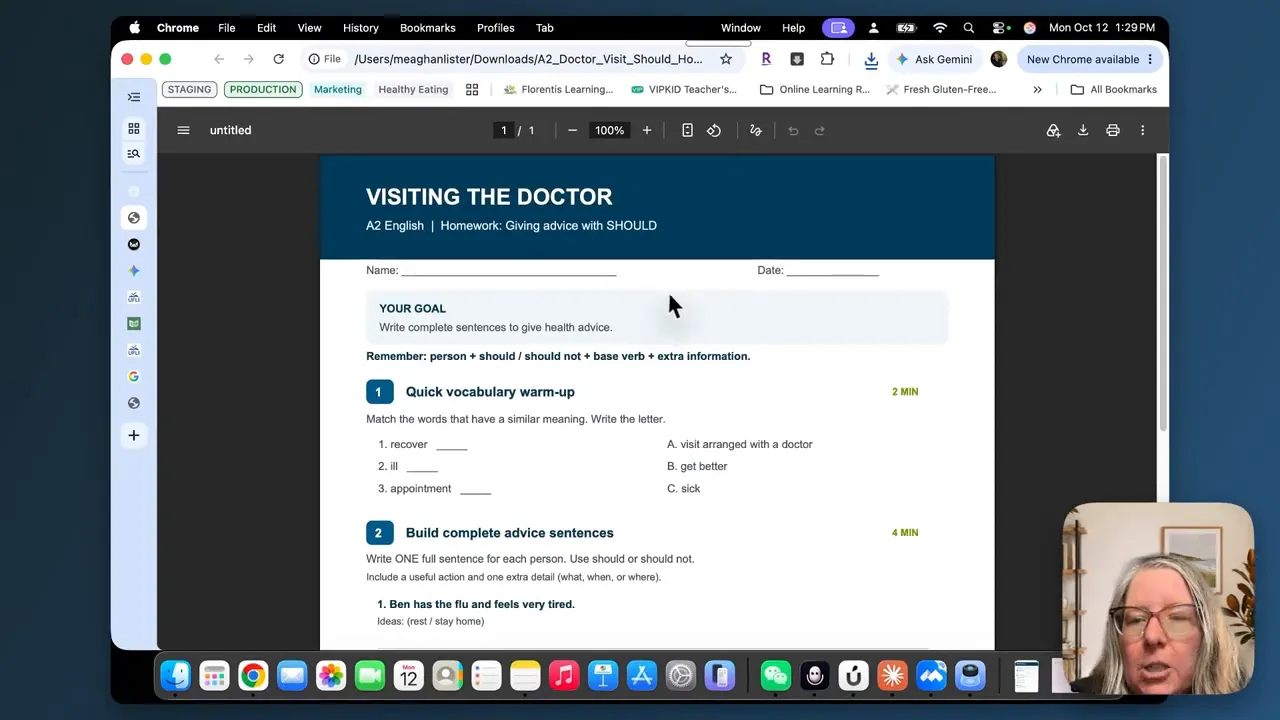
The formatting was clear, and the activity focused on the language the student actually needed to practice. It was something I would use, rather than a worksheet created simply to give homework.
9. Review Trial Lessons and Placement Assessments
Trial lessons involve a lot of things at once. You are listening, asking questions, adjusting difficulty, building rapport, considering the student’s level, and deciding what should happen next.
It is easy to miss a pattern while you are managing all of that.
Afterward, I can combine a written record of the lesson dialogue with the results from my Florentis placement assessment and my own observations. ChatGPT can then help me examine the evidence. For the next step, see my guide to what to teach after an ESL placement test.
A prompt to adapt
Review the attached lesson dialogue, placement-assessment results, and teacher observations together. Identify what the student can do independently, what requires teacher support, recurring language gaps, and the three highest-priority skills to develop. Support each recommendation with specific evidence from the lesson dialogue.
That distinction between independent performance and supported performance is useful. A student being able to complete a task after considerable help is not the same as being able to do it alone.
I think of this as another set of eyes on the lesson. It can highlight patterns I did not notice while teaching, but it does not make the placement or instructional decision for me.
10. Turn Rough Lesson Notes Into Useful Parent Feedback
After several back-to-back lessons, my notes may make perfect sense to me without being suitable for parent communication.
AI can help organize those notes into something short, clear, and professional. I use Letterfly in my own lesson-recording and feedback workflow, but the same organizing task can be done in ChatGPT.
A prompt to adapt
Turn these lesson notes into a brief parent update. Mention one specific success and one skill we are continuing to develop. Use a warm, professional tone. Stay strictly within the information in my notes, and do not overstate the student’s progress.
The guardrails are important. AI can make everything sound wonderful. Sometimes a little too wonderful.
I want the message to reflect what actually happened in class, not an inflated version of it. I always read the draft and check it against my notes before sending it.
There is also a non-AI option within the Florentis Learning Teacher Hub: lesson notes already have a starting structure, including vocabulary and student information, so adding a sentence can be enough. The hub can be used with Florentis Learning curriculum or through the Hub Solo plan with your own lessons and resources.
The Details That Make ChatGPT Prompts More Useful
Across these workflows, the biggest improvement comes from giving ChatGPT useful teaching information, not simply asking for more content.
Whenever possible, I specify:
- Level: Who is the activity for?
- Context: What are we learning, and is this a one-to-one online lesson, homework, or exam preparation?
- Target skill: What should the student actually practice?
- Evidence: What did the student say, write, or struggle to do?
- Constraints: How much time is available, and what format do I need?
- Boundaries: What should AI avoid, such as revealing answers, rewriting the work, or exaggerating progress?
You can also use the microphone to dictate your prompt rather than typing everything. That can be especially convenient when you already know what you want to ask.
I have collected these prompts in a free copy-and-paste guide so you can save them and substitute your own learner levels, lesson topics, target language, and student needs.
|

Use AI to Respond to the Student, Not Replace the Plan
The more I use AI, the less interested I am in having it replace everything I already have.
I still want a curriculum that tells me what I am teaching and what comes next. I want skills that build from lesson to lesson. And I want to make the instructional decisions myself.
But real students do not always follow the perfect plan. They finish early. They need a game or a visual. They struggle with something unexpected. They make a mistake that shows me exactly what we need to work on.
That is where AI is incredibly useful. It helps me create the story, picture, worksheet, scaffold, or extra practice that fits the student in front of me, without spending an unreasonable amount of preparation time.
Keep the structure. Keep the professional judgment. Use AI to make your teaching more responsive and personal.
Post your Comment About This Product