

Introduction
You’ve spent hours writing the perfect blog post—great title, beautiful layout, helpful tips—and then… nothing. No traffic, no clicks, no sign of it on Google. The truth is, it’s not that your post isn’t good—it’s that Google might not even know it exists.
Most bloggers assume that hitting “publish” means instant visibility, but without proper indexing, your post stays invisible to search engines. In this post, we’ll walk through exactly how to make sure your blog shows up in Google Search so all your hard work can finally be seen by the right readers.
[ez-toc]
What Does It Mean for a Blog to Be Indexed?
Think of Google like the world’s biggest library, and every website is a book. When you publish a blog post, it’s like writing a brand-new book—but unless Google adds it to its library (the index), no one can find it.
Indexing is the process where Google’s bots (called crawlers) scan your pages, understand what they’re about, and store them in its database. Only indexed pages can appear in search results.
If your blog isn’t indexed, it’s invisible online—even if it’s full of valuable content. That’s why making sure every post is indexed is the first and most important step in your SEO strategy.
How to Check If Your Blog Is Showing Up on Google
You can easily find out if Google has indexed your blog by using a few simple methods:
- Use the site search command
Go to Google and type:site:yourdomain.comThis shows every page from your domain that Google has indexed. If your latest posts don’t appear, they might not be indexed yet. - Use the URL Inspection Tool in Google Search Console
- Log into your GSC account.
- Paste the exact blog post URL into the search bar at the top.
- Google will show whether the page is indexed, crawled, or unknown to Google.
- If it’s not indexed, click “Request Indexing.”
- Search your post title in quotes
Try searching for your post title in quotation marks (e.g., “How to Make Money with Goats”). If nothing appears, Google hasn’t indexed it yet. - Check the Coverage Report
In GSC, go to Indexing → Pages to see which URLs are indexed, discovered, or excluded. This gives you an overview of how Google is crawling your site.
Common Reasons Your Blog Isn’t Indexed
Even if your blog looks perfect, a few hidden settings or technical issues can keep it from showing up on Google. Here are the most common reasons:
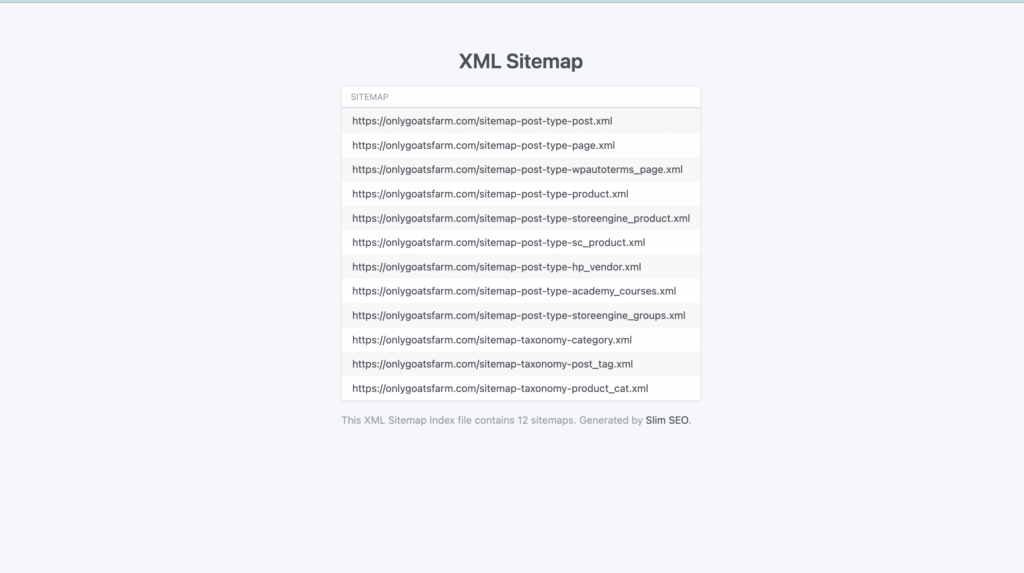
- You haven’t submitted a sitemap.
Without a sitemap, Google doesn’t have a roadmap of your site, so it may not discover new posts quickly (or at all). - Posts are set to “noindex.”
Some SEO plugins include a setting that tells Google not to index certain pages. Double-check your post settings in Rank Math, Slim SEO, or Yoast to make sure the “index” option is enabled. - Your robots.txt file is blocking crawlers.
If your robots.txt file includesDisallow: /, Googlebot can’t access your site. You want it to look more like:User-agent: * Disallow: Sitemap: https://yourdomain.com/sitemap.xml - Your site is brand new.
New domains take longer to build trust with Google, so indexing can be slower. Submitting a sitemap and requesting indexing helps speed that up. - Technical or speed issues.
Slow-loading or broken pages can prevent Google’s crawler from accessing your content. Check your site’s health with Google PageSpeed Insights or your hosting dashboard. - Thin or duplicate content.
If your posts are too short, copied, or overly similar to others, Google might choose not to index them.
Step-by-Step: How to Get Your Blog Indexed
If your blog isn’t showing up in search results, don’t panic—it’s fixable! Follow these simple steps to make sure Google finds and indexes your content:
- Set up or verify Google Search Console (GSC).
Go to search.google.com/search-console, add your website, and verify ownership. This is your control center for indexing and performance. - Check your sitemap connection.
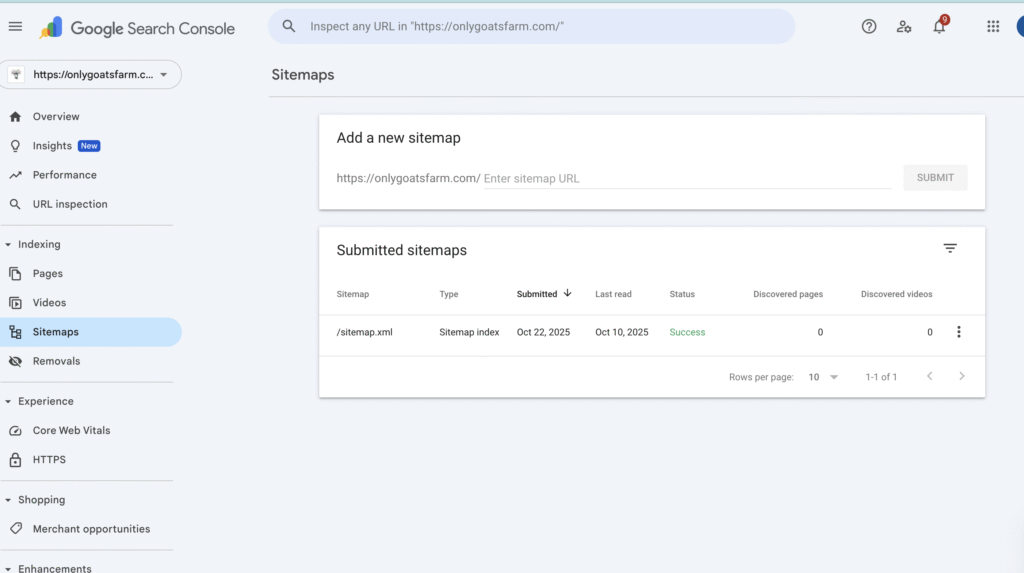
Navigate to Indexing → Sitemaps in GSC and make sure your sitemap (sitemap.xml) is submitted and showing a “Success” status. - Request indexing for new posts.
- Copy your full blog post URL.
- Paste it into the top search bar in GSC.
- If it says “URL is not on Google,” click Request Indexing.
This tells Google to crawl that page right away.
- Ensure your post is public and crawlable.
In your SEO plugin or post settings, confirm that it’s not marked “noindex” or “private.” - Check robots.txt permissions.
Visityourdomain.com/robots.txtand make sure it doesn’t block crawlers. If you seeDisallow: /, update it so Google can access your pages. - Resubmit after major updates.
When you significantly change or update a post, request indexing again to help Google refresh its data. - Wait a bit.
Indexing can take from a few hours to a few days, depending on your site’s authority and posting frequency.
How to Add and Submit a Sitemap to Google Search Console
A sitemap is like a blueprint of your website—it lists every page and post so Google can understand your site’s structure and easily find new content. Submitting a sitemap ensures Google doesn’t miss any pages, especially if your site is new or still growing.
Here’s how to add and submit your sitemap:
- Log in to Google Search Console (GSC).
Go to search.google.com/search-console and select your verified property. - Go to the Sitemaps section.
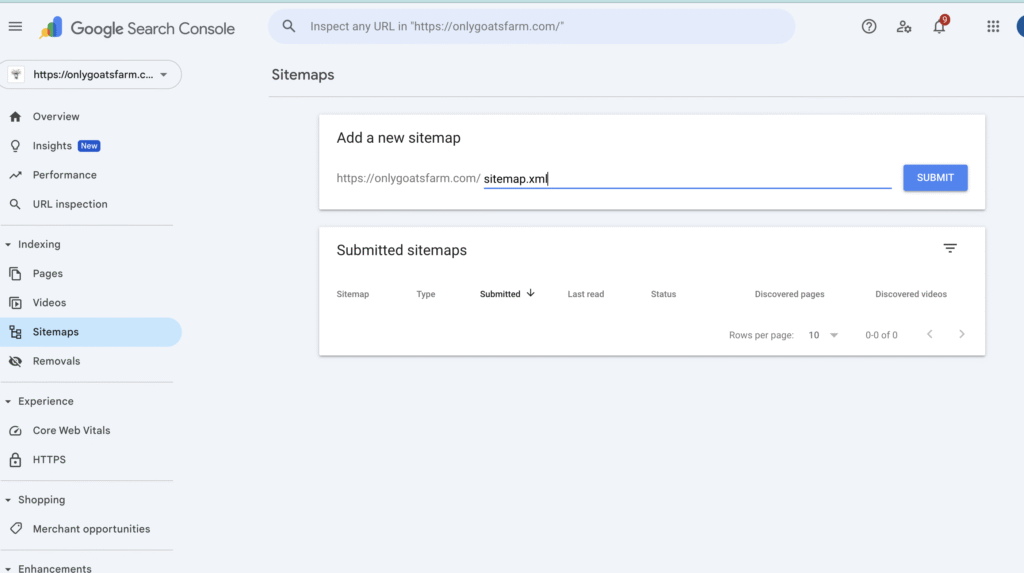
On the left-hand menu, click Indexing → Sitemaps. - Add your sitemap URL.
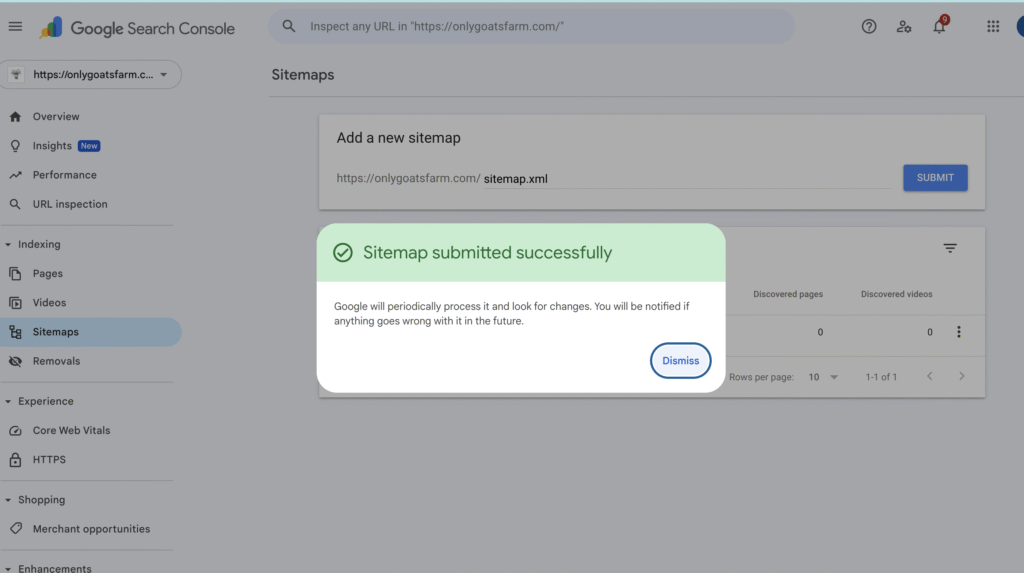
In the box, type:sitemap.xmlThen click Submit. - Check your submission status.
After a few moments, GSC will display a status such as “Success” or “Couldn’t fetch.”- ✅ Success: Your sitemap is working and Google can crawl your pages.
- ⚠️ Couldn’t fetch: Double-check your URL (it must be lowercase and without a slash before it) and make sure it loads when you visit it directly in your browser.
- Verify that URLs are being discovered.
Once your sitemap is accepted, you’ll begin seeing a “Discovered pages” count next to your sitemap listing within a few days. This means Google is actively scanning your blog. - Submit additional sitemaps if needed.
If you have category, page, or post-type sitemaps (likesitemap-post-type-post.xml), submit those too for faster discovery.
How to Speed Up Indexing for New Posts
If you’ve already submitted your sitemap and requested indexing, but your new posts still aren’t showing up, don’t worry—there are several ways to speed things up. These methods help signal to Google that your content is active, trustworthy, and worth crawling sooner rather than later.
- Add internal links to new posts.
Link to your newest post from older, already indexed posts. This tells Google it’s part of your established content network. - Share your posts on social media.
Platforms like Facebook, Pinterest, and Twitter create backlinks that help Google discover your pages faster. - Publish consistently.
When you post regularly, Google learns your site updates often and prioritizes crawling it more frequently. - Ensure your website is mobile-friendly.
Since Google uses mobile-first indexing, sites that display poorly on mobile devices can experience delays in indexing. - Improve loading speed.
Use image compression, caching plugins, and lightweight themes to keep your pages fast. Google prefers fast, user-friendly sites. - Submit important URLs manually.
For time-sensitive posts or launches, use the URL Inspection tool to request indexing right away. - Engage your audience.
Encourage readers to share your content. The more traffic and engagement a post receives, the more likely Google is to crawl it again soon.
Ongoing SEO Habits to Stay Visible
Once your blogs are indexed, the next goal is to stay visible. Google rewards sites that remain active, organized, and regularly updated. Make these habits part of your long-term blogging routine:
- Monitor your Coverage Report.
In Google Search Console, check which pages are indexed, excluded, or have errors. Fixing small issues early prevents big SEO problems later. - Refresh old content regularly.
Update posts every few months with new examples, keywords, and links. Then re-submit them for indexing to keep rankings strong. - Keep URLs clean and keyword-rich.
Short, descriptive URLs (like/make-money-with-goats) are easier for both users and Google to understand. - Use internal linking strategically.
Connect related posts so Google understands your site’s structure and readers stay on your page longer. - Check for crawl errors.
Broken links or 404 errors can hurt your rankings. Run an occasional site audit using tools like Ahrefs, Screaming Frog, or your SEO plugin. - Maintain a consistent publishing schedule.
Google favors active sites that publish quality content regularly, even if it’s just once a week. - Continue building backlinks.
When other reputable sites link to you, Google views your content as more trustworthy and increases your ranking potential.
Final Thoughts
Indexing is one of those behind-the-scenes steps that can make or break your blog’s success. You can write the best content in the world—but if Google can’t find it, no one else will either. Once you’ve set up your sitemap and started tracking your posts in Google Search Console, you’ve taken a huge step toward long-term SEO growth.
If you’re working on improving your SEO and consistency, this is exactly what we focus on in the Teacher Boss Society Blog Challenge. Inside the challenge, we walk through how to plan, write, and publish blog posts that not only show up on Google but actually drive traffic and enrollments. It’s designed to help teachers (and any content creators) turn their blogs into business tools instead of just passion projects.
Post your Comment About This Product