If you need ready made supplemental learning materials fast, Diffit AI is one of the handiest tools I have found. It generates reading passages, vocabulary, multiple choice and short answer questions, group activities, slides, exports and more—customized by language, grade, and standards. I use it for online teaching and classroom prep because it saves time and gives a solid starting point for lessons and homework.
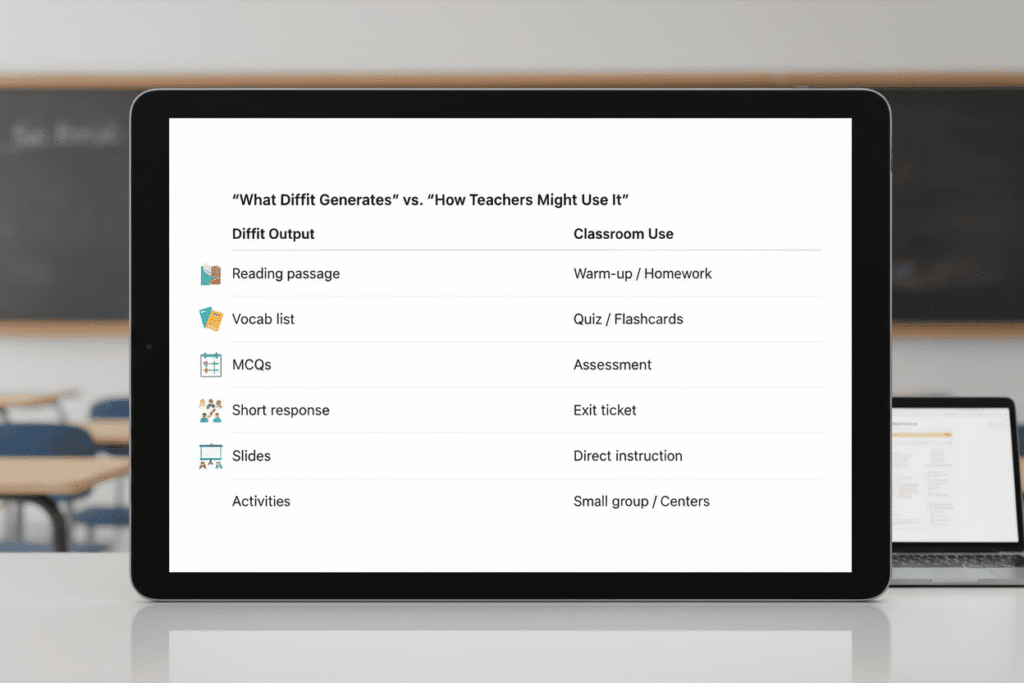
What Diffit AI can generate
- Reading passages and chapter summaries
- Key vocabulary with definitions, sentence prompts, and image prompts
- Multiple choice and short answer questions
- Group activities like think pair share and five W worksheets
- Slides for lessons and printable PDF worksheets
- Materials mapped to grade level and standards (Common Core and state standards)
- Book-based lesson packs (select chapters and get comprehension resources)
- Language lessons in other languages and exports to Google Slides
Quick walkthrough: build a lesson in minutes
Here is the basic workflow I follow. It takes just a few clicks to get a full lesson pack you can edit and export.
- Choose language and grade
Pick the language you want to teach and the grade level so the content matches learner ability. - Align to standards
You can select state or common core standards. This is great when you need to justify instruction or align to curriculum goals. - Pick a topic or text
Type the lesson topic or choose a book and chapters. For example, I made an English lesson about the moon landing to practice nouns, verbs, adjectives, and adverbs. - Choose activities and format
Decide whether you want pages, worksheets, or slides. You can add, remove, or replace activities such as think pair share, five W questions, cause and effect, or character trait work. - Customize and export
Edit prompts, swap activities, add videos or your vocabulary lists, then export to Google Slides or PDF for printing and sharing.
Examples I tried
Music theory slides for third grade
I asked Diffit to make slides for third grade music theory. It generated a slide deck that I could polish and use directly in class. You can delete or edit any activity that does not fit your teaching style.
Book-based lessons: 1984 and Harry Potter
Diffit can pull chapters from books and create resources around them. I tested it with chapters 7 through 10 of 1984 and with chapter 1 of Harry Potter and the Order of the Phoenix. It generated summaries, vocabulary, comprehension questions, and prompts for character traits and evidence. This is ideal for book clubs, literature circles, or reading homework.
Language teaching: basic Chinese greetings for kindergarten
You can generate slides and matching activities in other languages. I had Diffit create Chinese greeting slides for kindergarten. It produced picture prompts, matching vocabulary, and simple sentences—exportable as slides or printable pages.
Useful features and customization tips
- Premium features are marked with a crown. There is often a short trial so you can test premium activity types.
- Replace activities easily. If think pair share is not your thing, swap it for a graphic organizer, a bubble map, or a written commentary task.
- Add your own vocabulary lists and Diffit will generate matching pages and slides for them.
- Include media by adding a YouTube video and extracting text or transcripts to build comprehension tasks.
- Target different learners by adjusting grade level or simplifying prompts for kindergarten through adult learners.
- Resource library pulls together ready made activities if you need inspiration or quick add ons.
Best uses and who benefits most
- Teachers who need quick homework packs or substitute plans
- Online teachers preparing slide decks and worksheets for live lessons
- Book clubs and adult learners who want structured reading materials
- Language teachers looking for multilingual slides and matching activities
- Anyone who wants a customizable starting point and plans to edit output for their classroom
Tips to get the most out of Diffit AI
- Start with a clear topic and grade level to get focused content.
- Use the standards filter when you need aligned materials for reporting.
- Preview generated slides and delete irrelevant activities before exporting.
- Combine Diffit output with your own images or examples to make lessons look polished.
- Export to Google Slides to make quick edits and share with students or co teachers.
Final thoughts
Diffit AI is not perfect, but it creates robust, editable lesson packs in minutes. Whether you are making worksheets, slides, or homework, it saves time and gives you a framework to personalize. Try plugging in a topic, choose your grade and standards, and see how quickly you can produce a lesson you can use or adapt.
If you want to try it, go to the Diffit app, experiment with a topic you teach, and export to Google Slides or PDF to get started.
Leave a Reply