
As an online teacher, you do a lot more than lead live classes. You design lessons, build slide decks, write quizzes, manage student communication, and juggle marketing and scheduling across time zones. Over the last year I have been testing a handful of AI-powered tools that promise to take heavy-lifting off your plate. They do different things: some help you design polished lesson materials in minutes, others build interactive classrooms with teacher-only notes, and a few sit on your website to answer common questions while you sleep.
Below I break down the tools we explored, explain what each one does, share the strengths and the limits I noticed, and suggest the best uses for each. This is a straightforward tour: what the tools do, how they might help your teaching business, and what to watch out for. No installation steps, no technical deep dives—just the short, practical overview you can use when deciding what to try next.
Thank you, to Grant Glass, who introduced some of these to me today!
Quick list of tools covered
- Teach Guin (teachguin.ai) — an all-in-one AI classroom and lesson generator
- Gamma — AI slide and presentation generator
- Chat-based AI (ChatGPT and similar) — content and script generation, prompt engine
- Twee (twe.com) — teacher-focused lesson and worksheet generator
- Diffit (diffit / dfit tools) — similar teacher resource creator
- Tawk.to (talk T AWK in the chat) — free live chat widget for websites
- Netlify (Netlify.app) and WordPress — quick hosting and website platforms used alongside chat tools
Why these tools are worth exploring
AI tools are not about replacing teachers. They are about amplifying what we already do well. In practice they let you:
- Draft lesson scripts, slide decks, and worksheets in minutes instead of hours
- Generate images and visual prompts to support vocabulary, grammar, and concept teaching
- Bundle lesson materials into a single link or classroom space students can join
- Automate routine communication with prospective families through a website chat
- Quickly iterate on lesson difficulty by changing a single prompt (e.g., target grade level)
Teach Guin: an all-in-one AI classroom (teachguin.ai)
What it does
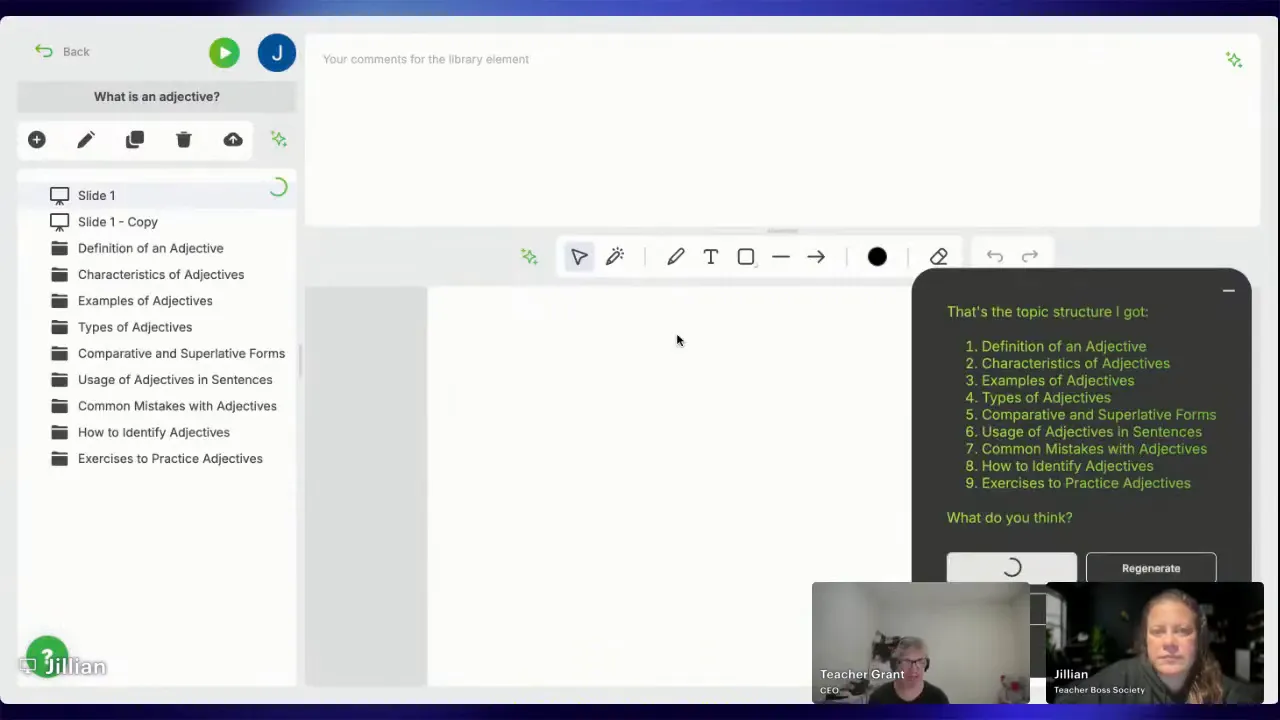
Teach Guin positions itself as an all-in-one online classroom built for teachers. Its AI assistant can generate lesson slides, teacher notes, images, and short activities based on a short prompt. It organizes materials into folders or slides, provides a teacher-side script or notes that are hidden from students, and exposes a shareable classroom link students join without creating accounts.
Key features to know
- AI-driven slide generation: tell the assistant the lesson focus and it drafts slide content and suggested images.
- Teacher notes: the teacher view includes a private script or talking points that students cannot see.
- Shareable classroom: send a single link and students can enter the classroom without signing up.
- Interactive whiteboard and annotation tools: you and learners can point, draw, and raise hands during live sessions.
- Export options: materials can be exported as PDFs or PPTs for offline editing or reuse.
Strengths
- The convenience of having slides, notes, and a classroom in one place saves time when preparing lessons.
- Teacher-only notes are a big win: you can plan what to say without cluttering the student view.
- No student signup lowers friction—the single link model is ideal for casual groups and trial classes.
- Built-in interactivity (drawing, arrows, raise hand) supports live teaching dynamics.
Limits and practical notes
- Images generated by the AI can be hit or miss. Expect some quirky or inaccurate visuals that you will want to edit out or laugh about with students.
- AI decisions can be generic if prompts are not specific. Age range, language level, or tone should be included in the prompt for better results.
- Some layout elements (PDF bar, image cropping) may require minor edits for classroom polish.
Best for
- Teachers who want a quick, integrated classroom experience with slide generation and teacher notes.
- Instructors running trial lessons and small group sessions where creating student logins would be disruptive.
Gamma: polished slide decks with an AI design focus
What it does
Gamma is an AI tool that transforms prompts and content outlines into visually polished slide decks. It focuses on design as much as content: layouts look modern, images are embedded, and the result is presentation-ready. Gamma is useful when you want nicer visuals or a quicker way to go from script to a presentable deck.
Strengths
- Design-first approach saves time when you want professional-looking slides fast.
- Good for streamlining public-facing or marketing presentations as well as class slides.
- Works nicely with text generated by AI chat services—paste a script and Gamma suggests layouts and visuals.
Limits and practical notes
- Some services place limits on lifetime usage or have tiered quotas.
- Text and visuals may still need tweaking for precise pedagogical suitability, especially for language learners.
Best for
- Teachers who care about visual polish and need slides for recorded lessons, webinars, or social platforms.
- Anyone who wants to reduce time spent on slide formatting while keeping content clear.
Chat-based AI (e.g., ChatGPT): content engine and prompt control
What it does
Chat-based AI systems are at the heart of the content generation flow. They produce scripts, vocabulary lists, reading passages, quiz questions, and step-by-step lesson outlines from short prompts. Teachers use chat AI to convert ideas into structured lessons, then feed those outputs into slide tools, classroom platforms, or worksheet generators.
Strengths
- Flexible: generate anything from a one-minute warm-up prompt to a full lesson plan.
- Fast iteration: change the grade level, tone, or learner type in a single line and get updated content.
- Great at turning teacher knowledge into a teachable script or into slides when combined with presentation tools.
Limits and practical notes
- Chat AI can be playful or mistaken. Short, ambiguous prompts sometimes produce whimsical or inaccurate responses.
- You will still want to fact-check and adapt content for language level and cultural sensitivity.
- Subscription tiers vary. Faster or more capable versions cost more, so weigh need versus budget.
Best for
- Drafting scripts and scaffolded activities.
- Generating differentiated prompts for mixed-level groups.
Twee and Diffit: teacher resource builders
What they do
Twee (twe.com) and Diffit (referred to as diffit / dfit in many chats) are focused platforms that generate complete lesson resources: worksheets, multiple choice quizzes, discussion prompts, true/false items, fill-in-the-gap exercises, and more. They are tailor-made for teachers who want ready-to-use materials with minimal editing.
Strengths
- Specifically designed for classroom use, so outputs tend to be formatted like worksheets and quizzes.
- Often include templates for different activity types to speed up lesson creation.
- Offer free trials and lower cost pro tiers compared to general-purpose AI subscriptions.
Limits and practical notes
- Free tiers may impose monthly run limits or restrict interactive features such as audio or video inclusion.
- Generated materials sometimes require level tuning; check vocabulary and grammar for the target learner group.
- Outputs are helpful starting points but rarely perfect out of the box—expect to make edits for classroom fit.
Best for
- Busy teachers who need printable or shareable worksheets quickly.
- Those who prefer templated resources over bespoke slide decks.
Live chat for your website: Tawk.to (often called Talk T AWK)
What it does
Tawk.to is a free live chat widget and messaging system you can add to your website. It allows automatic responses, canned replies, and human takeover when you are available. Many teachers use it to answer common questions about classes, pricing, availability, and trial booking so they do not have to reply to every inquiry manually.
Strengths
- Reduces the messages you have to answer in real time by handling common Q&A automatically.
- Provides a human handoff so you can step in when a lead is ready to book.
- Free tier is robust enough for many small teaching businesses.
Limits and practical notes
- Free tiers can come with limits on the number of autoresponses or advanced features.
- Automated replies need to be carefully written to avoid misleading or incorrect promises.
- Does not replace personal messaging apps that parents may prefer for ongoing student communication, but it is a great front-door tool.
Best for
- Teachers who get many website inquiries and want a first-line responder.
- Businesses that need to cover multiple time zones or take leads while offline.
Website hosting and integration: Netlify and WordPress
What they do
Hosting platforms like Netlify and content management systems like WordPress provide the web presence that ties everything together. Netlify is great for lightweight HTML pages and quick deployments; WordPress is excellent for duplicating content in multiple languages, adding booking widgets, and scaling a public-facing site.
Strengths
- Netlify is fast for small projects and single-page sites; WordPress provides robust content and plugin ecosystems.
- Both support embedding chat widgets and links to AI-generated classrooms or material downloads.
Limits and practical notes
- Hosting is not the tool itself; it is the platform where chat bots and lesson links live. Choose the platform that matches your comfort and growth plan.
- Duplicating pages for different languages is typically easier in WordPress if you plan to serve multiple markets.
Real classroom considerations and common patterns
Across all these tools, a few patterns emerge that will help you decide what to try first:
- Start with a clear prompt. The better you describe the learner level, age, and objective, the more usable the AI output will be.
- Expect to edit. AI saves time but rarely produces classroom-perfect materials on the first pass. Plan 10 to 20 minutes of editing to adapt wording, fix image quirks, and align activities to your learners.
- Use teacher-only notes. Platforms that support hidden teacher scripts or notes let you keep your classroom voice tight while presenting a clean student view.
- Watch images. Visuals are helpful but may be inaccurate or oddly rendered. Treat them as supportive, not central, unless you review them carefully.
- Let automations handle routine tasks. Website chatbots, autoresponders, and shareable classroom links reduce message fatigue and lower signup friction for trial or drop-in classes.
Pros and cons summary—at a glance
Teach Guin
- Pros: All-in-one classroom, teacher notes, fast slide drafts, shareable link without student sign-ups.
- Cons: Image quality varies; AI may be generic without specific prompts.
Gamma
- Pros: Presentation-ready slides, strong design output.
- Cons: Usage limits possible; may need edits for pedagogy.
Chat-based AI
- Pros: Extremely flexible content generator; ideal for scripts and differentiation.
- Cons: Can be whimsical or inaccurate; requires clear prompts and review.
Twee and Diffit
- Pros: Quick worksheets and quizzes; teacher-focused templates.
- Cons: Free tiers often limited; outputs need level tuning.
Tawk.to (Live chat)
- Pros: Free live chat, autoresponses, human handoff for leads.
- Cons: Limited automation in free tiers; must craft responses carefully.
Netlify and WordPress
- Pros: Host your links and chat widgets; WordPress simplifies multi-language content.
- Cons: Hosting is background infrastructure; pick one to match your site plans.
Practical classroom examples where these tools help most
Here are simple, real-world ways I used these tools in my teaching flow:
- Shared AI classroom for a trial lesson: Create a short 5-slide lesson with teacher notes and a shareable link so students can join without an account. Great for demo classes and one-off workshops.
- Slide generation for recorded content: Use Gamma to create a polished deck from a ChatGPT script and then record a voiceover for evergreen lessons you sell or reuse each term.
- Worksheet and quiz packs: Generate multiple-choice and fill-in-the-gap worksheets using Twe or Diffit for quick homework or leveled practice.
- Website front-door automation: Put a chat widget on your site to handle FAQs like pricing, age suitability, and trial availability. Let the chat forward warm leads to your scheduling link or billing page.
How to choose what to test first
If you are short on time, pick one area of your workflow to automate and trial a focused tool for that single need:
- Content generation for lessons: Start with ChatGPT to create scripts and Gamma to make slides.
- Ready-made student materials: Try Twee or Diffit for worksheets and quick assessments.
- Classroom delivery and teacher notes: Try an integrated classroom like Teach Guin that hides teacher notes and provides a one-link student entry.
- Lead capture and automation: Add Tawk.to or a similar chat widget to your site to handle new inquiries while you focus on teaching.
Final thoughts and realistic expectations
AI tools can dramatically cut prep time and help you deliver neater, more varied lessons. Expect a learning curve: the first week is about learning how to prompt effectively and what to edit. After that, these tools become time-savers rather than time-sinks.
Above all, remember that these technologies are assistants. The teacher still decides what is pedagogically appropriate, what visuals to show, and how to scaffold language practice. Use AI for the heavy lifting—drafting, design suggestions, and routine responses—so you can spend your energy on the human parts of teaching: feedback, encouragement, and live interaction.
Recap: Tools and what they do
- Teach Guin — AI classroom with teacher-only notes, slide generation, images, and shareable student links.
- Gamma — Design-forward slide and presentation generator for polished decks.
- Chat-based AI — Flexible content engine for scripts, lesson plans, and prompts.
- Twee — Teacher-oriented worksheet and lesson generator with templates.
- Diffit — Similar to Twee; creates graded materials and activities.
- Tawk.to — Free live chat widget to automate website inquiries and capture leads.
- Netlify and WordPress — Hosting and content platforms that hold your chat widgets and lesson links.
Try one tool this week and notice how much time it frees up. My suggestion is to pick the one that targets your biggest time drain—slides, quizzes, or messages—and see how much easier the week feels after you hand that task to an AI assistant.
Happy teaching. Keep the human part human and let the tools do the heavy lifting.
Leave a Reply